Networking Textbook
Chapter 1 - Networking Fundamentals
1.1 - Introduction to Networks
Definition and Purpose
Welcome to the exciting world of computer networking! In its simplest form, a network is a collection of interconnected devices that can communicate with each other. These devices aren’t just computers; they can include smartphones, tablets, printers, servers, and even smart home appliances. The fundamental purpose of networking is to facilitate the sharing of resources and enable seamless communication among these connected devices.
Imagine a small office without a network. If each employee needs to print a document, the company would have to purchase a printer for every single computer. If one employee creates an important document, sharing it with a colleague would involve saving it to a USB drive and physically transferring it. This approach is inefficient, costly, and prone to errors.
Now, consider that same office with a network. A single, powerful printer can be shared by everyone. Employees can access shared files stored on a central server, collaborating on projects in real-time without the need for physical media. Email and instant messaging allow for instant communication, regardless of physical proximity. This highlights the core advantages of networking:
Resource Sharing: Networks allow multiple users to share hardware resources like printers, scanners, and storage devices (servers), as well as software resources like applications and databases. This reduces costs and improves efficiency.
Communication: Networks provide the infrastructure for various forms of electronic communication, including email, instant messaging, video conferencing, and Voice over IP (VoIP). This enhances collaboration and decision-making.
Data Sharing: Centralized storage on servers allows for easy access and sharing of files and information among authorized users. This ensures data consistency and simplifies backups.
Cost Efficiency: Sharing resources like printers and internet connections across many users is far more economical than providing dedicated resources for each individual device.
Increased Productivity: Streamlined communication, easy access to shared resources, and collaborative tools collectively boost overall productivity within organizations and among individuals.
In essence, networks transform isolated islands of technology into a cohesive and powerful system, unlocking capabilities that would be impossible with standalone devices.
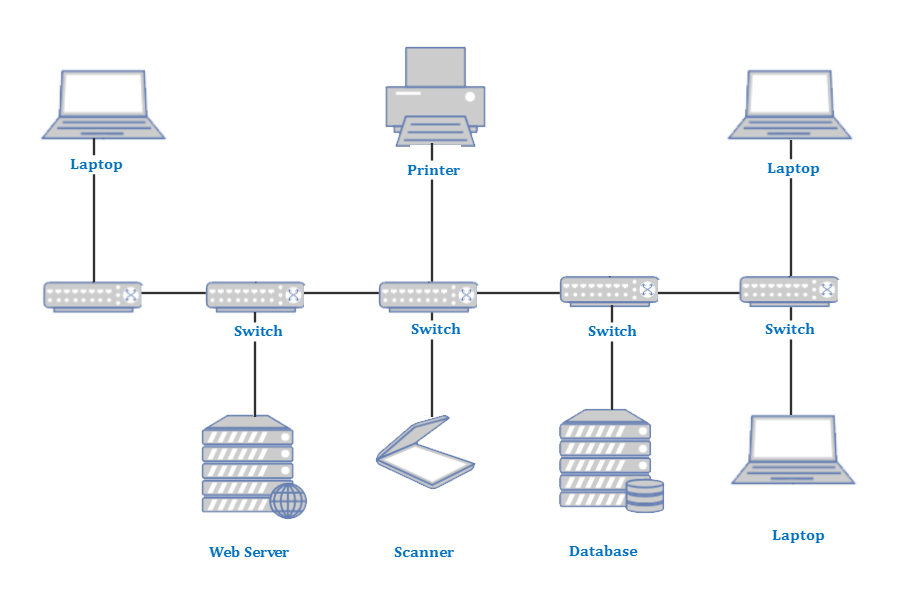
Network Types by Scale
Networks are not all created equal. They vary dramatically in size, complexity, and geographical reach. To better understand and categorize them, networks are often classified by their scale, meaning the area they cover. Let’s explore the most common types:
Personal Area Network (PAN) A Personal Area Network (PAN) is the smallest type of network, typically connecting devices within a short range, usually around an individual person. The range is often a few meters. PANs are designed for personal use, allowing devices like smartphones, smartwatches, Bluetooth headphones, and laptops to communicate directly with each other without necessarily needing an internet connection. Technologies commonly used in PANs include Bluetooth, NFC (Near Field Communication), and USB connections.
Example: Connecting your wireless headphones to your smartphone, syncing your fitness tracker with your tablet, or using a Bluetooth mouse with your laptop.
Local Area Network (LAN) A Local Area Network (LAN) connects devices within a limited geographical area, such as a single home, office building, or campus. LANs are characterized by their high data transfer rates and their use of technologies like Ethernet for wired connections and Wi-Fi for wireless connections. All devices in a LAN typically share a common communication medium and are under the control of a single organization or individual.
Example: Your home Wi-Fi network connecting your computers, smart TVs, and gaming consoles. An office network connecting all the workstations, servers, and printers within a single building.
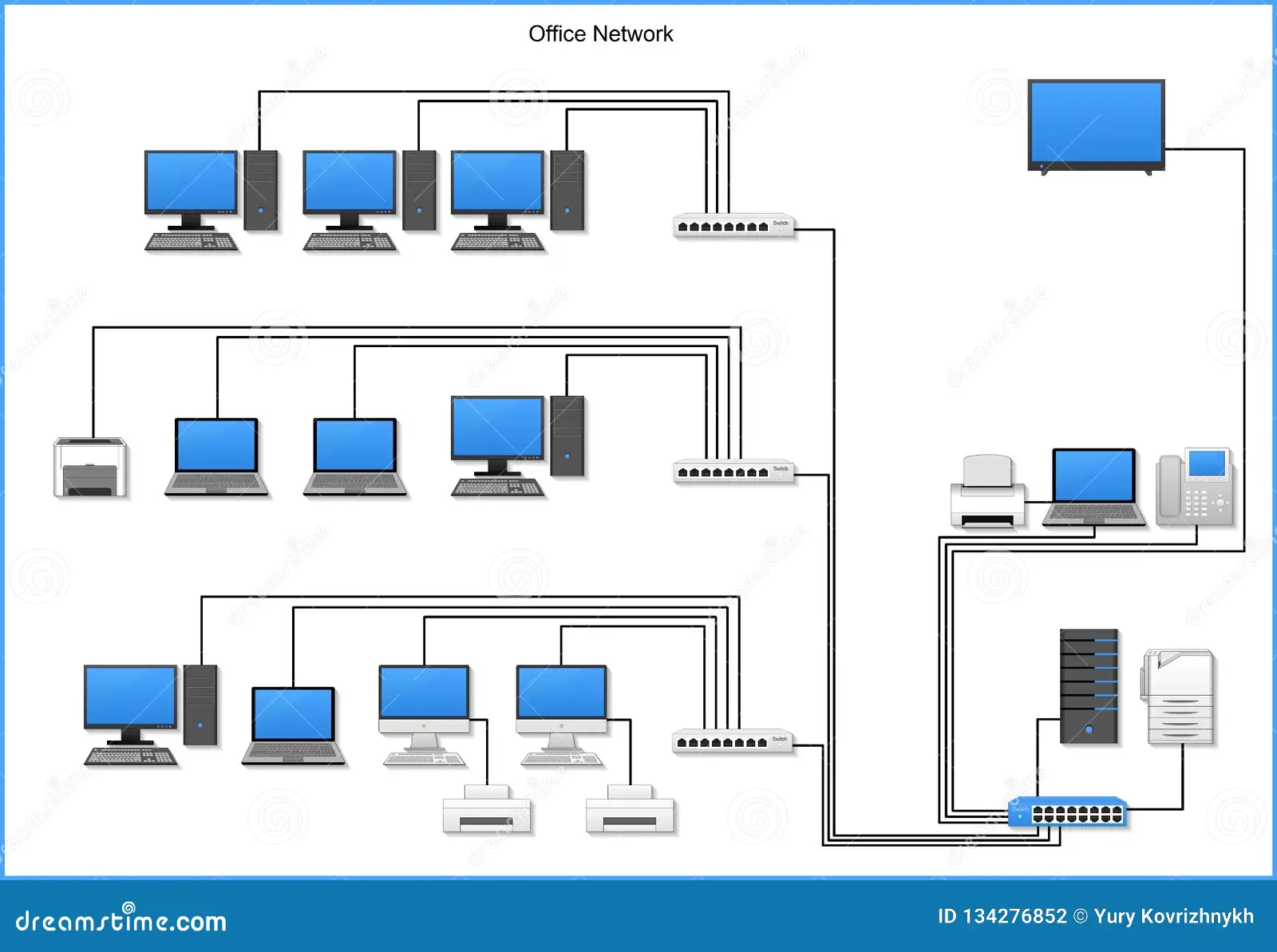
Campus Area Network (CAN) A Campus Area Network (CAN) is essentially a larger version of a LAN, encompassing multiple LANs within a defined geographical area, such as a university campus, a large business park, or an industrial complex. CANs are typically owned and managed by a single entity and are used to interconnect buildings and provide shared resources across the entire campus. They often utilize high-speed backbone connections to link the individual LANs.
Example: A university campus network connecting all the different academic buildings, dormitories, libraries, and administrative offices.
Metropolitan Area Network (MAN) A Metropolitan Area Network (MAN) spans a larger geographical area than a CAN, typically covering an entire city or a large town. MANs are designed to connect multiple LANs and CANs within a metropolitan region. They often use high-speed communication lines, such as fiber optics, and are frequently operated by a single entity, like a local government or a large service provider. The primary goal of a MAN is to provide connectivity over a wider urban area, facilitating data exchange between different organizations and residents.
Example: A city-wide network that connects various government offices, public libraries, and emergency services across the city.
Wide Area Network (WAN) A Wide Area Network (WAN) is the largest and most geographically dispersed type of network, covering vast distances, often across countries or even continents. The most prominent example of a WAN is the Internet itself. WANs connect multiple LANs, CANs, and MANs over large distances, typically using public telecommunication networks, satellite links, or dedicated private lines. Due to the vast distances, WANs generally have lower data transfer rates compared to LANs and CANs, but they enable global communication and resource sharing.
Example: A multinational corporation connecting its branch offices located in different countries. The entire internet, connecting millions of networks worldwide.
Network Architectures: Client-Server vs. Peer-to-Peer (P2P) Models
Beyond their geographical scale, networks can also be classified by their operational architecture, which dictates how devices interact and share responsibilities. The two primary models are Client-Server and Peer-to-Peer.
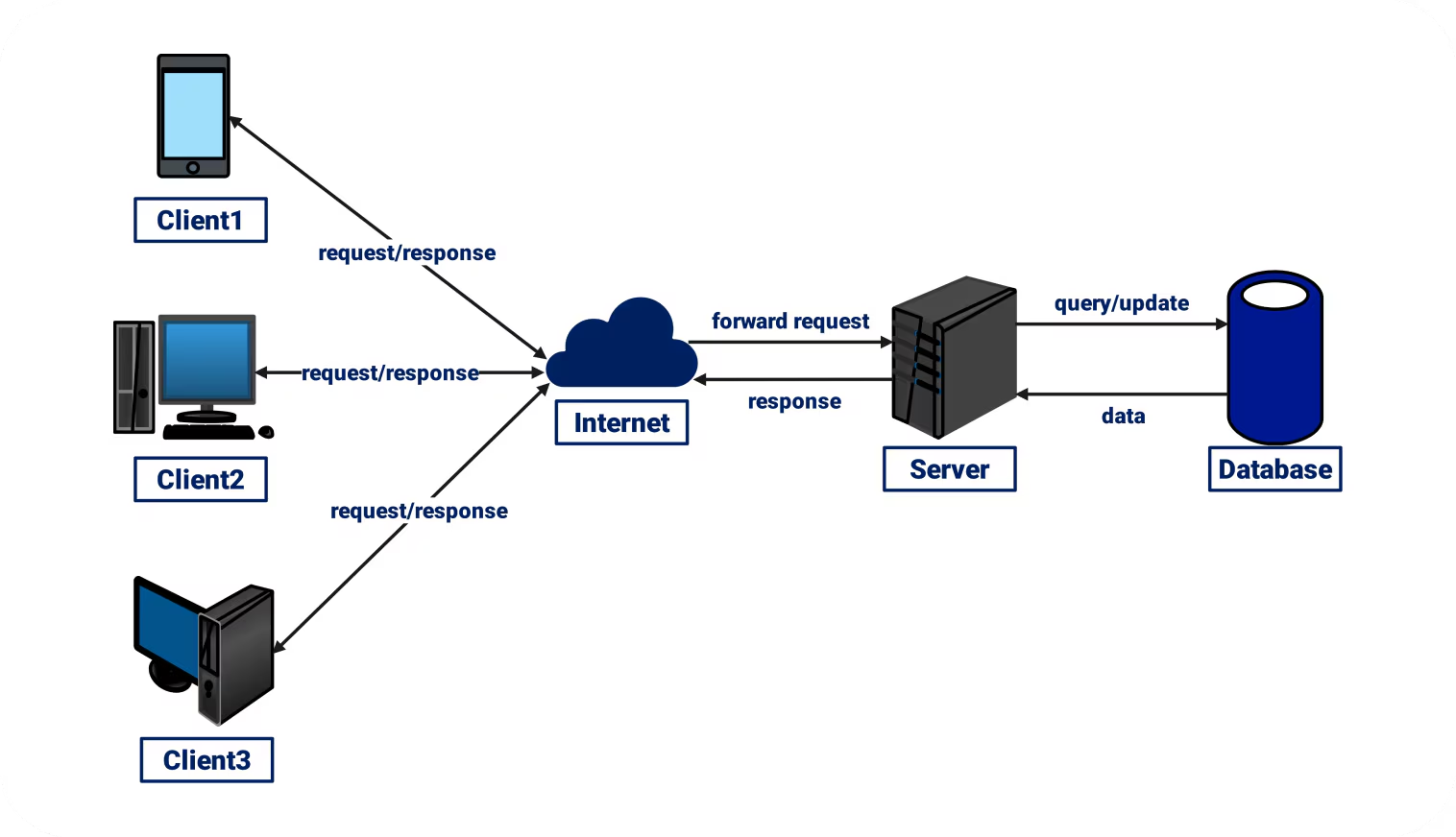
Client-Server Model The Client-Server model is the dominant architecture for most modern networks, especially in professional environments and on the Internet. In this model, there are dedicated servers that provide services and resources, and clients (workstations, smartphones, etc.) that request and consume those services.
Servers: These are powerful computers designed to store, manage, and provide resources to clients. Examples include file servers (storing documents), print servers (managing printers), web servers (hosting websites), and database servers. Servers are typically optimized for performance, reliability, and security, and often run specialized server operating systems.
Clients: These are the end-user devices that initiate requests for services from the servers. When you browse a website, your web browser acts as a client requesting web pages from a web server. When you save a document to a shared network drive, your computer acts as a client sending data to a file server.
Advantages of the Client-Server Model:
Centralized Management: Resources, security, and data backups can be managed centrally on the servers, simplifying administration.
Enhanced Security: Security policies and access controls can be strictly enforced at the server level.
Scalability: It’s relatively easy to add more clients or upgrade server capabilities to accommodate growth.
Reliability: If one client fails, the rest of the network and its resources remain operational. Servers are often redundant.
Disadvantages of the Client-Server Model:
Single Point of Failure (if not properly configured): If a central server goes down, clients may lose access to critical resources and services.
Higher Cost: Requires dedicated server hardware and specialized software, often leading to higher initial setup and maintenance costs.
Complexity: Setting up and managing client-server networks can be more complex, requiring skilled network administrators.
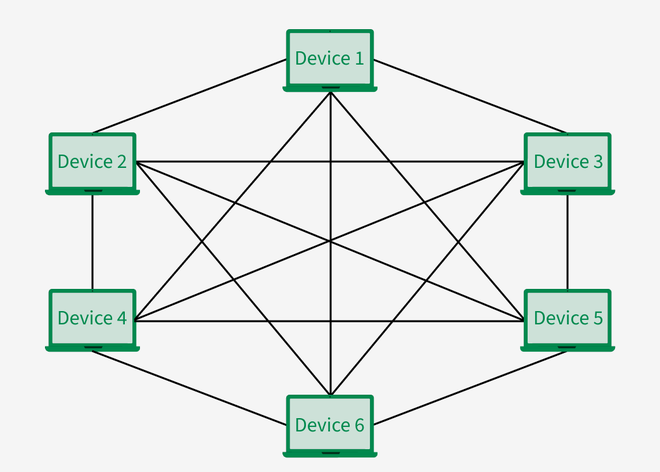
Peer-to-Peer (P2P) Model In a Peer-to-Peer (P2P) model, there are no dedicated servers. Instead, all connected devices (peers) are considered equal in their capabilities and responsibilities. Each device can act as both a client and a server, sharing its own resources (files, printers) directly with other peers and requesting resources from them.
Examples: Small home networks where computers directly share files or a printer. Certain file-sharing applications (like older versions of BitTorrent) and some online gaming platforms also utilize P2P elements, where users connect directly to each other to exchange data.
Advantages of the Peer-to-Peer Model:
Simplicity: Easy to set up and manage, often requiring minimal technical expertise.
Lower Cost: No need for dedicated servers or expensive server operating systems.
Robustness: If one peer fails, the rest of the network can often continue to function, as there’s no central point of failure.
Flexibility: Each user has control over their shared resources.
Disadvantages of the Peer-to-Peer Model:
Lack of Centralized Management: Managing security, backups, and resource availability across many independent peers can be challenging.
Security Concerns: Security can be more difficult to implement and enforce consistently across all peers.
Scalability Issues: Performance can degrade significantly as the number of peers increases.
Reliability Issues: If a peer with a shared resource goes offline, that resource becomes unavailable to others.
Choosing between a client-server and a peer-to-peer architecture depends heavily on the specific needs of the network, its size, budget, security requirements, and the level of administrative control desired. Larger organizations almost exclusively opt for the client-server model due to its scalability, security, and centralized management capabilities, while smaller home or very specific application networks might utilize a P2P approach for its simplicity and lower cost.
1.2 - Network Topologies
Understanding Topologies: Physical vs. Logical
In the previous chapter, we discussed the scale of networks and how they are architected. Now, we must look at the “map” of the network. In networking, the term topology refers to the arrangement of the various elements (links, nodes, etc.) of a computer network. Essentially, it is the structure of the network.
However, a topology is not just a drawing of where the cables go. There is a critical distinction between how a network looks and how it actually functions. This leads us to the two ways we define a topology:
Physical Topology The physical topology is the actual physical layout of the devices and the media (cables). It describes where the computers are located, how the cables are run through the walls or ceilings, and which ports on a switch or hub each cable is plugged into. If you were to walk into a server room and trace every wire with your finger, you would be tracing the physical topology.
Logical Topology The logical topology describes the path that data signals take as they travel from one device to another. It defines how the network behaves regardless of its physical appearance. For example, a network might be wired physically as a “Star” (all cables going to one central box), but logically it might behave like a “Bus” (where data is broadcast to every device simultaneously).
Understanding the difference is vital for troubleshooting. A network might “look” fine physically, but a logical error in how data is addressed or routed can bring the entire system to a halt.
Common Layouts: The Bus Topology
The Bus Topology is one of the oldest and simplest methods of connecting computers. In a bus network, all nodes (computers, printers, etc.) are connected to a single main cable called the backbone or the “bus.”
How it works: When a computer sends a message, that message travels in both directions along the backbone. Every device on the network “sees” the message, but only the device to which the message is addressed actually processes it.
Termination: To prevent signals from bouncing back and forth forever (signal reflection), both ends of the backbone must be capped with a terminator.
Advantages:
It is very easy to set up and requires the least amount of cable of all topologies.
It works well for very small networks.
Disadvantages:
Single Point of Failure: If the main backbone cable breaks or is cut, the entire network fails.
Performance Issues: As more devices are added, the network slows down because they all share the same “pathway.”
Troubleshooting: It is difficult to isolate where a problem is occurring along the line.
The Star Topology
The Star Topology is the most common layout used in modern Local Area Networks (LANs). In this configuration, every device has a dedicated cable that connects it directly to a central device, such as a Switch or a Hub.
How it works: If Computer A wants to send data to Computer B, the data first goes to the central hub/switch, which then manages the delivery to the destination. Unlike the bus topology, the devices do not share a single cable.
Advantages:
Fault Tolerance: If one cable breaks, only the device connected to that cable loses its connection. The rest of the network continues to function perfectly.
Scalability: It is very easy to add or remove devices without disrupting the network.
Management: Centralizing the connection point makes it easier to monitor and troubleshoot traffic.
Disadvantages:
Central Point of Failure: While individual cable breaks are fine, if the central Switch or Hub fails, the entire network goes down.
Cost: It requires significantly more cabling than a bus topology because every device needs its own dedicated line back to the center.
The Ring Topology
In a Ring Topology, each device is connected to two other devices—one “upstream” and one “downstream”—forming a continuous circular path for data.
How it works: Data travels around the ring in one direction (unidirectional). Each device acts as a repeater, receiving the signal and passing it to the next device. To prevent data collisions, these networks often use a Token. A “Token” is a small packet that circles the ring; a computer can only send data if it currently “holds” the token.
Advantages:
No Collisions: Because of the token-passing system, data doesn’t “bump” into other data.
Performance: It can handle high-traffic loads better than a bus topology.
Disadvantages:
Failure Vulnerability: In a standard ring, if one workstation or one cable fails, the entire loop is broken, and the network goes down.
Difficulty to Reconfigure: Adding or removing a device requires “breaking” the ring, which momentarily takes the whole network offline.
The Mesh Topology
The Mesh Topology is the ultimate design for reliability. In a “Full Mesh,” every single device is connected to every other device on the network.
How it works: Because there are multiple paths between any two points, the network is incredibly “redundant.” If one path is blocked or a cable is cut, the data simply takes another route.
Partial Mesh: In many real-world scenarios, a “Partial Mesh” is used, where only the most critical devices (like main servers or routers) have multiple connections to each other.
Advantages:
Maximum Reliability: It is almost impossible for the entire network to fail.
Privacy: Since data can travel over dedicated lines, it is more secure than shared-media topologies.
Disadvantages:
Complexity and Cost: The amount of cabling and the number of ports required on each device make this the most expensive and difficult topology to install.
The Hybrid Topology
Rarely do large organizations use just one of the topologies mentioned above. Instead, they use a Hybrid Topology, which combines two or more different topologies into one large network.
Example: A common hybrid is the Star-Bus network. Several “Star” networks (representing different departments in a company) might be connected to a single “Bus” backbone that runs between floors of a building.
Advantages:
Flexibility: It allows a network to grow and adapt based on the specific needs of different areas.
Efficiency: You can use a Mesh for your critical servers but a simple Star for the employee workstations to save on costs.
Disadvantages:
Complex Maintenance: It requires specialized knowledge to manage different types of layouts and the hardware that connects them.
Topology |
Best For… |
Primary Advantage |
Primary Disadvantage |
Cost Level |
|---|---|---|---|---|
Bus |
Very small, temporary setups. |
Cheapest and simplest to install. |
One break in the cable kills the whole network. |
low |
Star |
Modern office and home LANs. |
Highly reliable; one cable failure only affects one device. |
If the central switch fails, everything goes down. |
Medium |
Ring |
Specialized industrial or high-traffic networks. |
No data collisions; handles high volume well. |
Adding/removing devices interrupts the network. |
Medium |
Mesh |
Core backbone of the Internet; critical data centers. |
Maximum redundancy; virtually impossible to fail. |
Extremely expensive and difficult to manage. |
High |
Hybrid |
Large corporations with multiple departments. |
Highly flexible; combines the strengths of other types. |
Complex to design and maintain. |
High |
1.3 - The OSI and TCP/IP Models
The Concept of Layered Models
In the early days of networking, communication between computers was a chaotic affair. Different manufacturers created their own proprietary hardware and software that couldn’t “talk” to one another. To solve this, the industry moved toward a layered approach.
Think of a layered model like a professional kitchen. The person washing the dishes doesn’t need to know the secret recipe for the sauce; they just need to know how to clean the plates. Similarly, the person plating the food doesn’t need to know how the stove works. Each “layer” performs a specific task and passes the result to the next layer. This modularity allows for troubleshooting, upgrades, and compatibility across different vendors.
The OSI 7-Layer Model
The Open Systems Interconnection (OSI) model is a conceptual framework used to understand how data moves through a network. While it is rarely used in its pure form for modern software, it remains the “gold standard” for teaching networking concepts and troubleshooting.
Layer 7: The Application Layer This is the layer closest to the user. It provides network services directly to applications. It’s important to note that the “application” isn’t the software itself (like Chrome), but the protocol the software uses to communicate.
Examples: HTTP (Web), SMTP (Email), FTP (File Transfer).
Layer 6: The Presentation Layer This layer acts as the “translator.” It ensures that data is in a usable format and is where data encryption, compression, and character encoding (like ASCII or JPEG) occur.
Function: Making sure the receiver can actually read what the sender sent.
Layer 5: The Session Layer The Session layer manages the “conversation” between two devices. It opens, maintains, and terminates connections (sessions) between applications.
Function: Checkpointing and recovery. If a connection drops, this layer manages the restart.
Layer 4: The Transport Layer This is a critical layer for data integrity. It handles flow control (not sending data faster than a device can handle) and error correction. It decides whether to use a “reliable” connection (TCP) or a “fast” one (UDP).
Protocol Data Unit (PDU): Segments.
Layer 3: The Network Layer This layer is responsible for routing. It determines the best physical path for the data to take across different networks. It handles logical addressing (IP addresses).
Key Device: Router.
PDU: Packets.
Layer 2: The Data Link Layer This layer provides node-to-node data transfer. It handles physical addressing (MAC addresses) and detects errors that may have occurred at the physical layer.
Key Device: Switch.
PDU: Frames.
Layer 1: The Physical Layer This is the “hardware” layer. It consists of the actual physical cables, connectors, and the electrical or optical signals (bits) that represent data.
PDU: Bits.
The TCP/IP Model (The Internet Protocol Suite)
While the OSI model is great for theory, the TCP/IP model is what the internet actually runs on. It was developed by the Department of Defense (DARPA) and is more streamlined, consisting of only four layers.
Application Layer: Combines the OSI’s Application, Presentation, and Session layers.
Transport Layer: Maps directly to the OSI Transport layer (TCP/UDP).
Internet Layer: Maps to the OSI Network layer (IP addressing).
Network Access Layer: Combines the OSI’s Data Link and Physical layers.
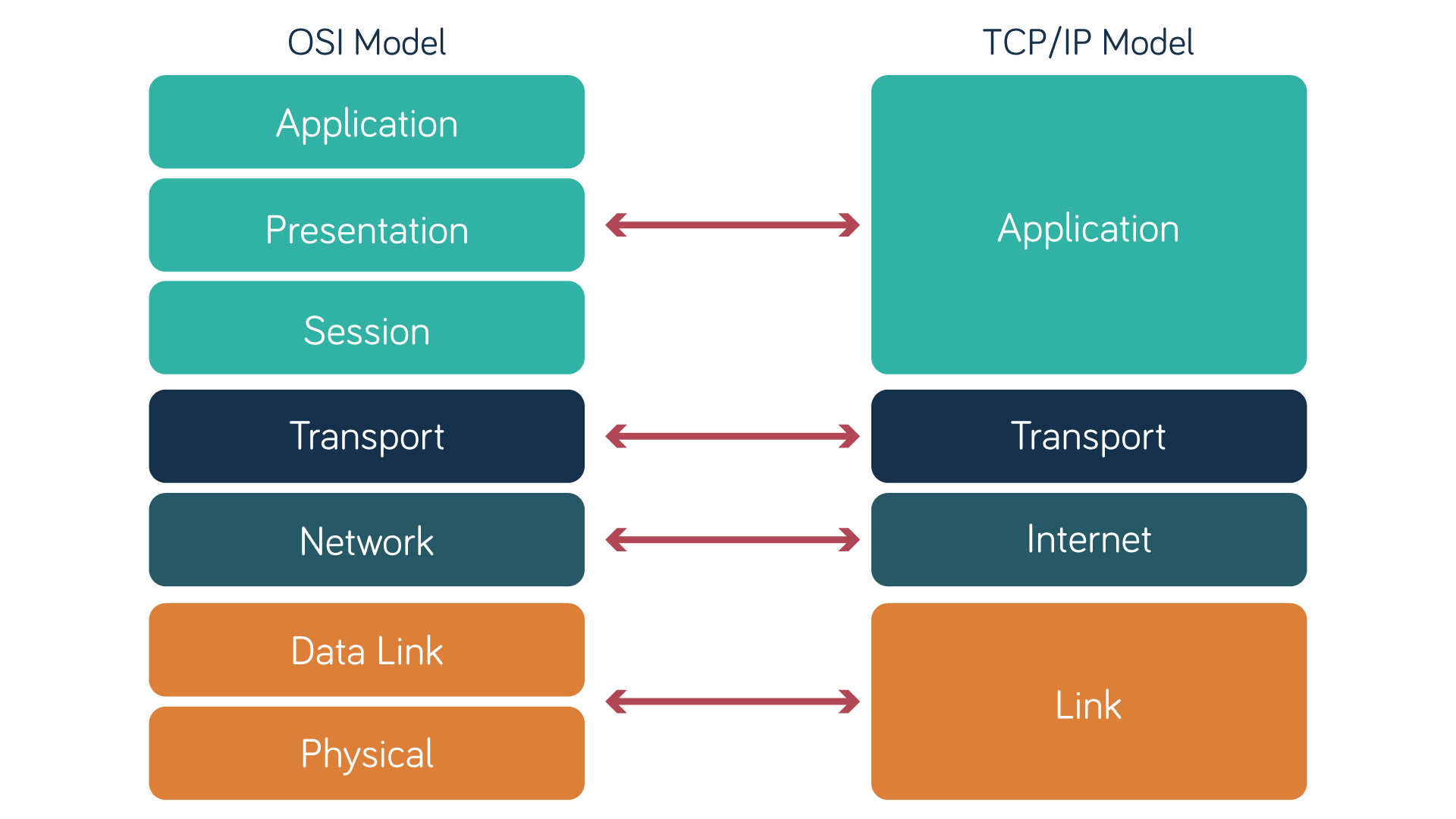
The primary difference is that TCP/IP is a functional model—it’s the set of rules that makes the internet work—whereas OSI is a descriptive model used to categorize functions.
Data Encapsulation and De-encapsulation
When you send an email, the data doesn’t just jump onto the wire. It must be prepared for travel. This process is called Encapsulation.
Imagine you are sending a letter.
Data: You write the letter (Application/Presentation).
Segments: You put it in an envelope and decide if it needs “Certified Mail” (Transport).
Packets: You write the recipient’s address and your return address (Network/IP).
Frames: The post office puts your envelope into a larger shipping crate with a specific route barcode (Data Link/MAC).
Bits: The crate is physically moved via truck or plane (Physical).
As the data moves down the layers, each layer adds a Header (and sometimes a Trailer).
At Layer 4: Data + TCP Header = Segment.
At Layer 3: Segment + IP Header = Packet.
At Layer 2: Packet + Ethernet Header/Trailer = Frame.
At Layer 1: The Frame is converted into Bits (1s and 0s).
When the data reaches the destination, the process is reversed. This is called De-encapsulation. The receiving device strips off the headers layer by layer until only the original data remains for the application to use.
Why We Use Both Models
Students often ask, “If we use TCP/IP, why learn OSI?”
The answer lies in troubleshooting. When a network engineer says, “It’s a Layer 3 issue,” they are using the OSI language to say there is an IP address or routing problem. If they say, “Check Layer 1,” they mean check if the cable is plugged in. The OSI model provides a universal language for professionals to pinpoint where a failure is occurring.
Summary of Layer Functions
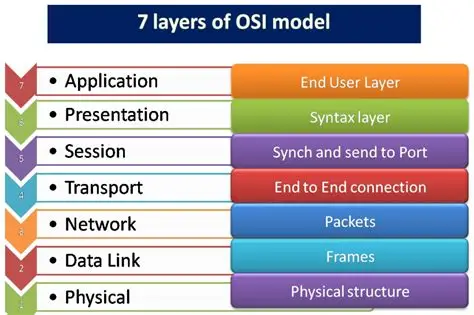
To wrap up this subtopic, refer to this table for a quick breakdown of what happens at each stage of the communication process:
Layer # |
Name |
PDU |
Primary Responsibility |
Common Examples / Protocols |
|---|---|---|---|---|
7 |
Application |
Data |
Network services for user applications. |
HTTP, FTP, SMTP, DNS |
6 |
Presentation |
Data |
Data translation, encryption, and compression. |
JPEG, GIF, SSL/TLS, ASCII |
5 |
Session |
Data |
Managing and terminating “dialogues” between devices. |
NetBIOS, RPC, Sockets |
4 |
Transport |
Segment |
End-to-end communication, reliability, and flow control. |
TCP, UDP |
3 |
Network |
Packet |
Routing data between different networks (logical paths). |
IP, ICMP, IPsec |
2 |
Data Link |
Frame |
Physical addressing and error detection for direct links. |
Ethernet (MAC), PPP, Switches |
1 |
Physical |
Bits |
Transmission of raw bit streams over physical media. |
Cables, Hubs, Wi-Fi Radio Waves |
1.4 - Transmission Media
The Physical Layer Foundation
In the previous chapter, we explored the OSI model and saw that everything eventually boils down to Layer 1: The Physical Layer. Transmission media is the actual “highway” that carries data from one location to another. Whether it’s a physical copper wire or an invisible radio wave, every medium has specific characteristics that dictate how fast data can travel, how far it can go, and how susceptible it is to errors.
Transmission media is broadly divided into two categories:
Guided Media (Wired): Physical paths like cables that “guide” the signal along a specific route.
Unguided Media (Wireless): Electromagnetic signals that travel through the air or vacuum in many directions.

Wired Media: The Physical Connection
Wired media uses physical conductors to transmit signals. The three most common types are twisted-pair, coaxial, and fiber optic.
Twisted-Pair Cables Twisted-pair is the most common cable used in LANs today. It consists of color-coded copper wires twisted together in pairs. Why the twist? Copper wires acting as conductors create magnetic fields; twisting the wires cancels out these fields, reducing electrical interference from neighboring pairs.
Unshielded Twisted-Pair (UTP): The standard for most offices. It’s cheap and flexible but vulnerable to outside interference.
Shielded Twisted-Pair (STP): Includes a foil wrapping to protect against heavy electromagnetic interference (EMI), common in industrial environments.
Categories: You will most often see Cat5e (supports up to 1 Gbps) and Cat6 (supports up to 10 Gbps over shorter distances).

Coaxial Cable Once the standard for television and early networking, coaxial cable consists of a single thick copper core surrounded by insulation, a braided metal shield, and an outer jacket. Today, it is mostly used by cable internet providers (broadband) to bring the internet from the street into your home modem. It is more resistant to interference than UTP but is bulkier and harder to install.
Fiber Optic Cable Unlike copper, which uses electricity, fiber optics use pulses of light sent through strands of extremely pure glass or plastic. This is the gold standard for modern high-speed networking and long-distance communication.
Speed and Distance: Fiber can carry data significantly faster and over much longer distances (kilometers vs. meters) without losing signal quality.
Immunity: Because it uses light instead of electricity, it is completely immune to electromagnetic interference (EMI). You can run a fiber cable next to a giant power generator, and the data will be perfectly safe.
Wireless Media: Breaking the Tethers
Wireless media uses the electromagnetic spectrum to send data through the air. While this provides incredible mobility, it introduces new challenges in security and signal stability.
Radio Waves Radio waves are omnidirectional, meaning they travel in all directions from the source. This makes them ideal for Wi-Fi and cellular networks.
Wi-Fi (802.11): Operates primarily on 2.4 GHz and 5 GHz frequencies.
Bluetooth: A low-power radio wave used for short-range Personal Area Networks (PANs).
Microwaves and Infrared Microwaves: These are unidirectional and require “line-of-sight.” If a building or mountain is in the way, the signal is blocked. They are often used to connect two buildings across a street where digging a trench for cables is impossible.
Infrared: Uses high-frequency light waves. Because it cannot pass through walls, its use is limited to things like TV remotes or secure, short-range device syncing in a single room.
Signal Degradation: The Enemy of Connectivity
No transmission medium is perfect. As a signal travels, it inevitably loses quality. Understanding why this happens is key to network design and troubleshooting.
1. Attenuation Attenuation is the weakening of a signal as it travels further from its source. Imagine shouting to a friend: the further away they are, the quieter your voice sounds until it disappears.
Copper: Has high attenuation (Standard Ethernet is limited to about 100 meters).
Fiber: Has very low attenuation, allowing signals to travel miles before needing a boost.
2. Interference (EMI/RFI) Electromagnetic Interference (EMI) occurs when outside electrical signals disrupt the data on a wire. This often happens when network cables are run too close to fluorescent lights, heavy machinery, or power lines.
3. Crosstalk Crosstalk is a specific type of interference where signals from one wire “bleed” into an adjacent wire. In networking, this is why UTP wires are twisted—the twist helps prevent this “leakage” and ensures the data stays on its intended path.

Summary Table of Media Characteristics
To wrap up this subtopic, refer to this table for a quick breakdown of what happens at each stage of the communication process:
Medium |
Max Distance |
Speed |
Cost |
Interference Risk |
|---|---|---|---|---|
UTP (Cat6) |
100 Meters |
Up to 10 Gbps |
Low |
High |
Coaxial |
500 Meters |
Up to 1 Gbps |
Medium |
Medium |
Fiber Optic |
100+ Kilometers |
100+ Gbps |
High |
None |
Wireless |
Varies |
Up to 10 Gbps |
Medium |
High |
1.5 - Networking Hardware
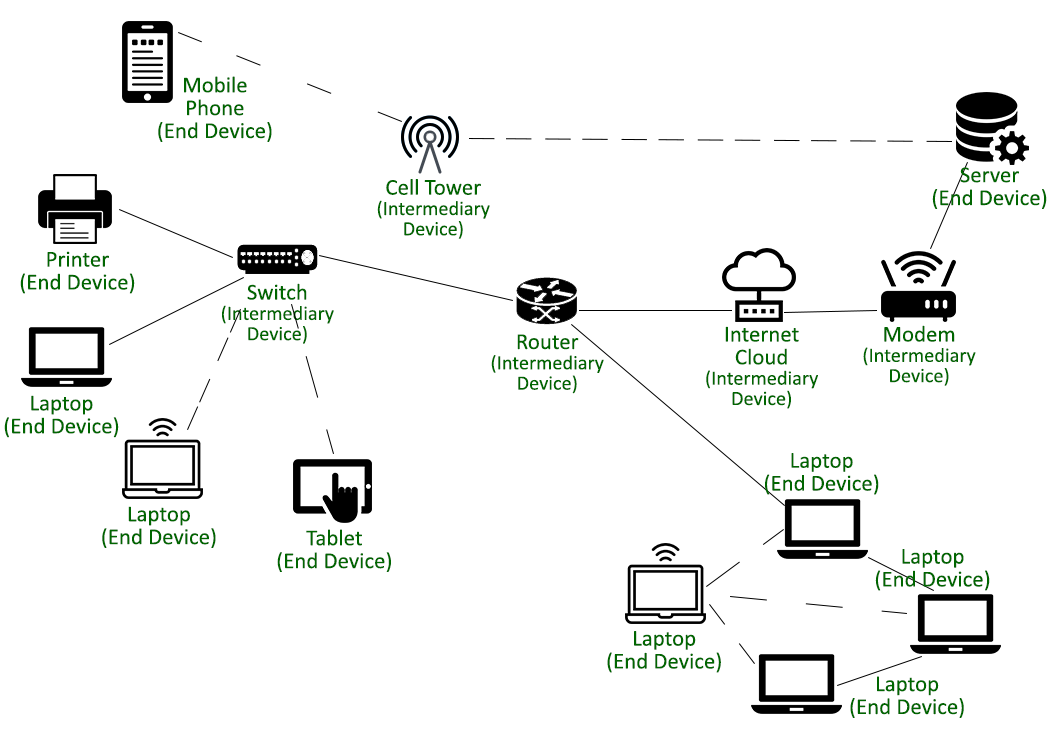
The modern digital landscape is built upon a complex infrastructure of hardware components. While software protocols define how data is formatted, it is the physical hardware—the wires, circuits, and processors—that provides the path for every bit of data to travel from point A to point B. In this chapter, we will explore the three primary categories of networking hardware: end devices, intermediary devices, and connectivity gateways.
End Devices: The Source and Destination
In networking terminology, an End Device (or host) is a piece of hardware that either originates or receives a data packet. These are the devices users interact with directly.
Personal Computers (PCs) and Laptops
The most common end devices are workstations and laptops. They serve as the primary interface for human-to-network interaction. Each PC is equipped with a Network Interface Card (NIC), which provides the physical connection to the network and houses the device’s unique MAC address.
Servers
Unlike a standard PC, a server is designed to provide services to other devices on the network. Whether it is a web server hosting a site or a file server storing shared documents, these devices are built for high availability and high-speed throughput.
VoIP Phones
Voice over IP (VoIP) phones are specialized end devices that convert analog voice signals into digital data packets. Unlike traditional landlines, these phones connect directly to an Ethernet port and function as independent hosts on the network.
Intermediary Devices: The Traffic Controllers
Intermediary devices connect individual end devices to the network and can connect multiple networks to form an internetwork. Their primary role is to ensure data flows efficiently and securely across the infrastructure.
Hubs and Bridges (Legacy Devices)
Hubs: The simplest intermediary device. A hub receives a packet on one port and blindly broadcasts it to all other ports. This often leads to “collisions” and network congestion.
Bridges: A step up from hubs, bridges divide a network into two segments. They keep track of which MAC addresses are on which side, reducing unnecessary traffic.
Switches
A switch is a “smart” bridge with multiple ports. It uses a MAC Address Table to identify which device is connected to which port. When a switch receives a frame, it only sends it to the specific port where the destination device is located.
Routers
While switches connect devices within a single network (LAN), Routers connect different networks together. Routers operate at the Network Layer and use IP addresses to determine the best path for data to travel across the internet.
Modems and Access Points: Extending the Reach
To connect a local network to the global internet or to provide mobility, specialized hardware is required to translate signals.
Modems
The word “Modem” is a contraction of MOdulator-DEModulator. Its job is to convert digital data from a computer into analog signals (like those used by cable or phone lines) and vice versa. It acts as the gateway between your home/office and your Internet Service Provider (ISP).
Wireless Access Points (WAPs)
An Access Point provides wireless connectivity to end devices. It connects to a wired router or switch via an Ethernet cable and broadcasts a Wi-Fi signal. Modern routers often combine the functions of a router, switch, and access point into a single “Wireless Router” box.
Summary of Device Functions
To better understand how these devices interact, we can compare their primary functions and the layer of the OSI model at which they operate.
Device |
OSI Layer |
Primary Function |
|---|---|---|
Hub |
Layer 1 (Physical) |
Repeats electrical signals to all ports. |
Switch |
Layer 2 (Data Link) |
Filters and forwards frames based on MAC addresses. |
Router |
Layer 3 (Network) |
Determines the best path for packets using IP addresses. |
Access Point |
Layer 2 (Data Link) |
Extends a wired network into a wireless signal. |
Critical Thinking and Troubleshooting
Understanding hardware is the first step in network troubleshooting. For instance, if a single PC cannot connect to the internet, the issue likely resides in the End Device (NIC) or the cable. If an entire floor loses connectivity, the culprit is likely an Intermediary Device like a switch. If the entire building is offline, the Router or Modem is the first place to look.
> Key Takeaway: Network hardware is organized hierarchically. End devices generate the data, switches manage local traffic, and routers handle global communication.
1.6 - Protocols and Standards
The Language of Networks: Introduction to Ethernet (802.3)
In the realm of networking, a protocol is a formal set of rules that governs how data is transmitted and received. Without these rules, devices would be like people trying to communicate using different languages and social cues—complete chaos.
Ethernet (IEEE 802.3)
Ethernet is the ubiquitous standard for wired Local Area Networks (LANs). First developed in the 1970s and later standardized as IEEE 802.3, it defines the physical and data-link layers of the OSI model. Ethernet relies on frames to package data, ensuring that information reaches the correct MAC (Media Access Control) address on a local segment.
Key characteristics of Ethernet include:
CSMA/CD: A “listen before speaking” approach to manage data collisions (though largely obsolete in modern switched networks).
High Reliability: Wired connections offer stable speeds and low latency compared to wireless alternatives.
Scalability: From the original 10 Mbps to modern “Terabit Ethernet,” the standard has evolved while maintaining backward compatibility.
The Rise of Mobility: Wi-Fi (IEEE 802.11)
While Ethernet keeps us anchored, Wi-Fi (IEEE 802.11) provides the freedom of mobility. Wi-Fi uses radio waves to transmit data through the air, operating primarily in the 2.4 GHz, 5 GHz, and more recently, 6 GHz frequency bands.
Variations of 802.11
The Wi-Fi standard has seen several iterations, each improving speed and efficiency:
802.11n (Wi-Fi 4): Introduced MIMO (Multiple Input, Multiple Output).
802.11ac (Wi-Fi 5): Focused on higher throughput in the 5 GHz band.
802.11ax (Wi-Fi 6/6E): Optimized for high-density environments like stadiums or offices.
Because the air is a shared medium, Wi-Fi uses CSMA/CA (Carrier Sense Multiple Access with Collision Avoidance), where devices broadcast an intent to send data to prevent overlapping signals.
The Internet Protocol Suite (TCP/IP)
The “Internet Protocol Suite” is the conceptual model that allows the global internet to function. It is often referred to as TCP/IP, named after its two most important protocols.
IP (Internet Protocol)
The Internet Protocol is responsible for addressing and routing. Every device on a network is assigned an IP address (IPv4 or IPv6), which acts like a digital mailing address. IP is a “connectionless” protocol, meaning it focuses on getting a packet to its destination but does not guarantee it arrives in one piece.
TCP vs. UDP: Reliability vs. Speed
At the Transport Layer, we find two distinct ways to move data:
TCP (Transmission Control Protocol): Connection-oriented. It performs a “three-way handshake” to establish a connection. It ensures all data arrives in the correct order and retransmits any lost packets. Used for web browsing and email.
UDP (User Datagram Protocol): Connectionless. It sends data without checking if it was received. It is much faster and is used for “real-time” applications like gaming and video calls.
The Directory and the Delivery: DNS and HTTP/S
Protocols at the Application Layer are what users interact with most directly, even if they never see the underlying code.
DNS (Domain Name System)
Humans are bad at remembering numbers like 142.250.190.46, but we are great at remembering google.com. DNS is the “phonebook of the internet,” translating human-readable domain names into machine-readable IP addresses.
HTTP and HTTPS (Hypertext Transfer Protocol)
HTTP is the foundation of any data exchange on the Web. It is a request-response protocol; your browser asks for a page, and the server sends it back.
HTTPS is the secure version, using TLS (Transport Layer Security) to encrypt the data. This prevents “man-in-the-middle” attacks, ensuring that your credit card info or passwords remain private.
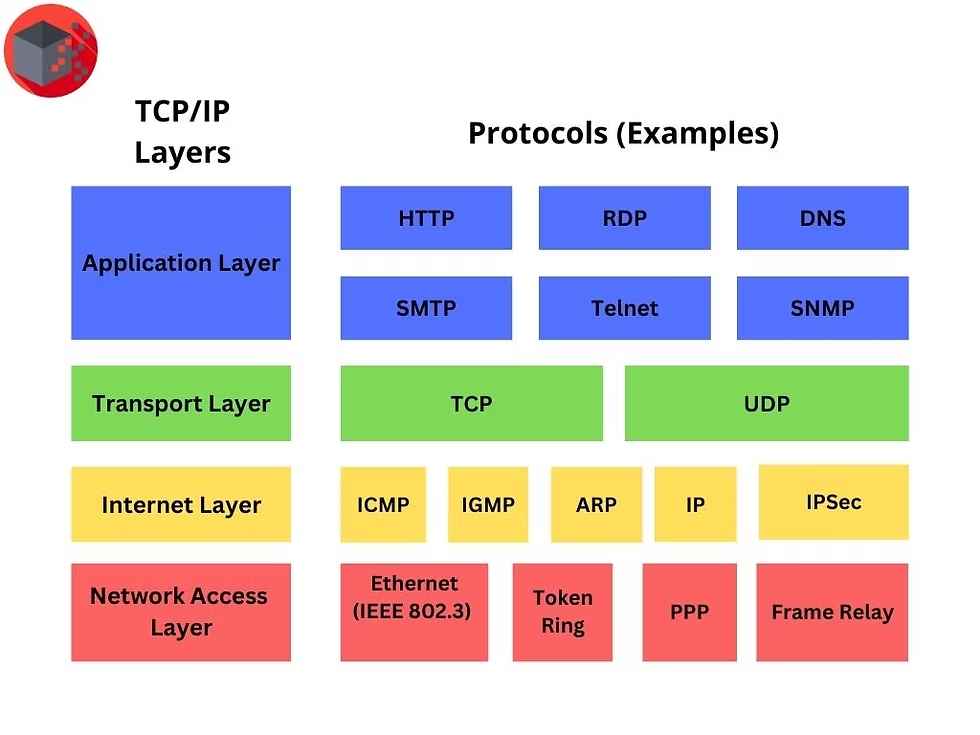
Summary of the Protocol Stack
To visualize how these protocols interact, we look at the encapsulation process. As data moves down the stack, each layer adds its own header (metadata) to the package.
Protocol |
Layer |
Primary Function |
|---|---|---|
HTTP/S |
Application |
Web content delivery and encryption |
DNS |
Application |
Domain name to IP translation |
TCP/UDP |
Transport |
End-to-end communication and reliability |
IP |
Network |
Logical addressing and routing |
Ethernet/Wi-Fi |
Data Link/Physical |
Physical transmission and local framing |
Understanding these layers is crucial for troubleshooting. If you can “ping” an IP address but can’t open a website, the issue likely isn’t your physical Ethernet cable; it’s more likely a DNS or HTTP error.
1.7 - IP Addressing Basics
Every device connected to a network needs a unique identifier to ensure data sent across the globe reaches the correct destination. This is the role of the Internet Protocol (IP) address. Think of it as a digital home address for your computer, smartphone, or smart toaster.
IPv4 vs. IPv6: The Great Expansion
For decades, the world relied almost exclusively on IPv4 (Internet Protocol version 4). However, the explosion of the “Internet of Things” (IoT) meant we eventually ran out of “room.”
IPv4: The Veteran Standard
An IPv4 address is a 32-bit numeric address written as four numbers separated by periods (dotted-decimal notation). Each number ranges from 0 to 255.
Structure: 192.168.1.1
Capacity: Approximately 4.3 billion addresses ().
IPv6: The Infinite Future
As billions of new devices came online, the 4.3 billion limit of IPv4 became a crisis. IPv6 was developed to solve this. It uses a 128-bit address, written in hexadecimal and separated by colons.
Structure: 2001:0db8:85a3:0000:0000:8a2e:0370:7334
Capacity: Approximately 340 undecillion addresses (). To put that in perspective, we could assign an IP address to every atom on the surface of the Earth and still have plenty left over.
Public vs. Private Addresses
Not every IP address is visible to the entire world. To manage the limited supply of IPv4 addresses, the industry split them into two categories: Public and Private.
Public IP: The address assigned to your router by your Internet Service Provider (ISP). This is how the “outside” internet sees your home or office.
Private IP: The addresses used within your local network (LAN). Your laptop, phone, and printer all have private IPs (usually starting with 192.168.x.x or 10.x.x.x). These cannot be reached directly from the outside world, providing a basic layer of security.
The Role of NAT (Network Address Translation)
Since private IPs are not unique globally (millions of people use 192.168.1.1 simultaneously), how does your router know which device requested a specific website? The answer is NAT.
NAT acts like a mailroom clerk in an apartment building. The building has one street address (Public IP), but many internal apartment numbers (Private IPs). When you send a request, the router swaps your private IP for the public IP and keeps a table to remember who asked for what.
Subnetting Overview
Subnetting is the practice of dividing a single large network into smaller, manageable sub-networks, or “subnets.”
Why Subnet?
Efficiency: It reduces network traffic by containing “broadcasts” (messages sent to everyone) within a smaller group.
Security: It allows administrators to isolate departments (e.g., keeping the Accounting department’s data away from the Guest Wi-Fi).
Organization: It makes it easier to troubleshoot and manage IP assignments.
The Subnet Mask
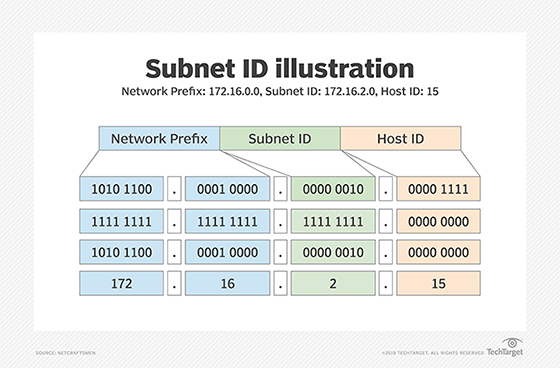
To determine which part of an IP address refers to the network and which part refers to the specific host (device), we use a Subnet Mask.
For example, in a common home network:
IP Address: 192.168.1.5
Subnet Mask: 255.255.255.0
The “255”s tell the computer that the first three numbers (192.168.1) are the “neighborhood,” while the “0” indicates that the last number (5) is the specific “house.”
Classless Inter-Domain Routing (CIDR)
In modern networking, we often see a slash after an IP address, such as 192.168.1.0/24. This is called CIDR notation. The number after the slash tells you exactly how many bits are locked for the network portion.
A /24 is equivalent to a mask of 255.255.255.0.
A /8 would mean only the first number is the network, leaving millions of addresses for hosts.
Understanding subnets is the key to designing networks that are both fast and secure. As you move forward in networking, you will learn to calculate these subnets using binary math to ensure no IP address goes to waste.
Summary Checklist
IPv4 is exhausted; IPv6 provides a near-infinite replacement.
Private IPs stay inside; Public IPs go outside.
NAT allows multiple devices to share one Public IP.
Subnetting breaks big networks into smaller, more efficient pieces.
Chapter 1 Quiz
1.1 - Introduction to Networks
Which network type would be used to connect a smartphone to a pair of wireless earbuds?
WAN
LAN
PAN
MAN
In a Client-Server architecture, what is the primary role of the “Server”?
To request data from other workstations.
To provide and manage shared resources and services.
To act as a peer with equal administrative rights.
To serve as the physical cable connecting devices.
1.2 - Network Topologies
Which topology is the most “fault-tolerant” because every node is connected to every other node?
Star
Bus
Mesh
Ring
What is the difference between a physical and a logical topology?
Physical is the software; Logical is the hardware.
Physical is the actual wiring; Logical is the path data takes.
Physical is for WANs; Logical is for LANs.
There is no difference.
1.3 - The OSI and TCP/IP Models
At which OSI layer does a Router operate?
Layer 2 (Data Link)
Layer 3 (Network)
Layer 4 (Transport)
Layer 7 (Application)
What is the correct order of data encapsulation as it moves down the layers?
Bits -> Frames -> Packets -> Segments
Segments -> Packets -> Frames -> Bits
Packets -> Segments -> Bits -> Frames
Data -> Frames -> Segments -> Packets
1.4 - Transmission Media
Which medium is completely immune to Electromagnetic Interference (EMI)?
Unshielded Twisted Pair (UTP)
Coaxial Cable
Fiber Optic Cable
Radio Waves
What term describes the weakening of a signal as it travels further from its source?
Crosstalk
Interference
Attenuation
Reflection
1.5 - Networking Hardware
Why is a Switch considered “smarter” than a Hub?
It can connect to the Internet directly.
It broadcasts data to all ports to ensure delivery.
It uses MAC addresses to send data only to the specific destination port.
It does not require power to operate.
Which device is used to connect two or more different networks (subnets) together?
Access Point
Router
Repeater
Bridge
1.6 - Protocols and Standards
Which protocol is responsible for ensuring “reliable” delivery by using acknowledgments?
UDP
IP
TCP
ICMP
What does the DNS (Domain Name System) protocol do?
Assigns IP addresses to devices automatically.
Encrypts web traffic.
Maps human-readable names (like google.com) to IP addresses.
Transfers files between a client and a server.
1.7 - IP Addressing Basics
How many bits are in an IPv4 address?
32 bits
48 bits
64 bits
128 bits
What is the primary purpose of NAT (Network Address Translation)?
To convert MAC addresses to IP addresses.
To allow multiple devices on a private network to share one public IP address.
To speed up the transmission of fiber optic signals.
To provide a secondary backup for the DNS server.
Answer Key
Question |
Answer |
Explanation |
|---|---|---|
1 |
C |
PAN (Personal Area Network) is for very short-range personal device connections. |
2 |
B |
Servers provide services; clients request them. |
3 |
C |
Mesh provides multiple redundant paths for data. |
4 |
B |
Physical is the layout; Logical is the signal flow. |
5 |
B |
Routers make decisions based on IP addresses at Layer 3. |
6 |
B |
Segments (L4), Packets (L3), Frames (L2), Bits (L1). |
7 |
C |
Fiber uses light, which is not affected by electrical interference. |
8 |
C |
Attenuation is signal loss over distance. |
9 |
C |
Switches use a MAC Address Table to switch traffic efficiently. |
10 |
B |
Routers are the gateways between different networks. |
11 |
C |
TCP is connection-oriented and reliable; UDP is “best effort.” |
12 |
C |
DNS is the “phonebook” of the internet. |
13 |
A |
IPv4 is 32-bit; IPv6 is 128-bit. |
14 |
B |
NAT helps conserve the limited supply of public IPv4 addresses. |
Chapter 2 - Packet Analysis
2.1 - The Anatomy of a Packet
Definition and Purpose
To a security analyst, a packet is more than just a unit of data—it is a digital footprint. To distinguish a legitimate request from a malicious exploit, you must first master the standard “anatomy” of network traffic. This chapter breaks down how data is structured, wrapped, and negotiated across the wire.
Encapsulation and Decapsulation
Data does not travel alone; it travels in a “suit of armor.” As data moves down the OSI Model from the application to the physical wire, each layer adds its own header (and sometimes a trailer). This process is called Encapsulation.
Encapsulation (Sending): The Application layer creates data, the Transport layer adds a TCP/UDP header (Segment), the Network layer adds an IP header (Packet), and the Data Link layer adds an Ethernet header/trailer (Frame).
Decapsulation (Receiving): The receiving host strips these headers one by one, moving back up the stack to deliver the raw data to the intended application.
Protocol Headers: The Deep Dive
Headers contain the metadata required for routing, error checking, and sequencing. In packet analysis, these fields are where we find “anomalies.”
Ethernet (Layer 2)
The outermost layer of the packet on a local network.
Source/Destination MAC Address: 48-bit hardware addresses.
EtherType: Tells the receiver which protocol is inside (e.g., IPv4 or IPv6).
IP - Internet Protocol (Layer 3)
The “envelope” for the packet, responsible for routing across networks.
Source/Destination IP: Where it’s from and where it’s going.
TTL (Time to Live): A counter that prevents packets from looping forever.
Protocol: Identifies the next header (e.g., 6 for TCP, 17 for UDP).
TCP & UDP (Layer 4)
The transport layer handles how the data is delivered.
TCP (Transmission Control Protocol): Connection-oriented. Includes Sequence Numbers (to keep data in order) and Flags (to manage the connection state).
UDP (User Datagram Protocol): Connectionless and “fire-and-forget.” Minimalist header used for speed (DNS, streaming).
ICMP - Internet Control Message Protocol
Unlike TCP/UDP, ICMP doesn’t carry application data; it carries messages about the network.
Type and Code: Define the message (e.g., Type 8 is an Echo Request, Type 3 is Destination Unreachable).
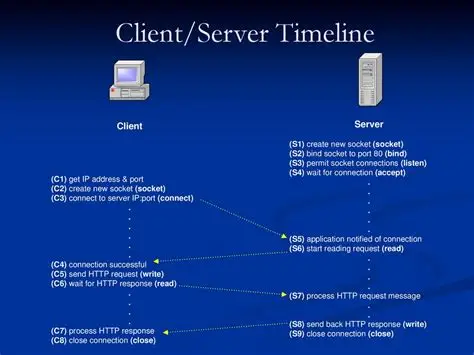
The Three-Way Handshake
TCP uses a specific “handshake” to establish a reliable connection. As an analyst, you will look for this sequence to confirm that a connection was actually successful.
SYN (Synchronize): The client sends a packet with the SYN flag set and an initial sequence number ($ISN$).
SYN-ACK (Synchronize-Acknowledge): The server responds with its own $ISN$ and acknowledges the client’s $ISN$ by sending back $ISN + 1$.
ACK (Acknowledge): The client acknowledges the server’s response. The “virtual circuit” is now open.
> Security Tip: Attackers often exploit this via a SYN Flood. They send thousands of SYN packets but never send the final ACK, forcing the server to keep “half-open” connections until it crashes.
Key Fields for Security Analysis
When using a tool like Wireshark, keep your eyes on these specific fields to spot trouble:
Field |
Potential Security Issue |
|---|---|
Flags |
Out-of-order or strange combinations (like “Xmas” scans) can indicate reconnaissance. |
TTL Value |
Drastic changes in TTL can suggest a Man-in-the-Middle (MitM) interception. |
Checksum |
Incorrect checksums often indicate packet tampering or corrupted hardware. |
Port Numbers |
Traffic on unexpected ports (e.g., HTTP over Port 4444) often signals a Reverse Shell or C2 activity. |
2.2 - Mastering the Tools (Wireshark & Tshark)
In the world of packet analysis, Wireshark is the undisputed heavy hitter for GUI-based deep-packet inspection, while its command-line sibling, Tshark, is the scalpel used for automated and remote analysis. This chapter focuses on moving beyond simply “starting a capture” to efficiently navigating massive amounts of data.
Filters: Capture vs. Display
One of the most common mistakes a junior analyst makes is trying to drink from a firehose. If you capture every packet on a busy 10Gbps link, you will crash your application or fill your disk in minutes. You must understand the two-stage filtering process.
Capture Filters (Berkeley Packet Filter - BPF)
These are applied before the data is written to the buffer. If a packet doesn’t match the filter, it is discarded immediately.
Syntax: Uses BPF syntax (e.g., host 192.168.1.1, tcp port 80).
Pro: Saves CPU and disk space; essential for high-traffic environments.
Con: Once a packet is filtered out, it is gone forever. You cannot “undo” a capture filter after the trace is finished.
Display Filters
These are applied after the data is captured. They simply hide packets from your current view.
Syntax: Uses Wireshark’s proprietary syntax (e.g., ip.addr == 192.168.1.1, http.request.method == “POST”).
Pro: Powerful and non-destructive. You can change your mind and view different data at any time.
Con: Requires the computer to process and store all packets, which can be resource-intensive.
Following Streams: Seeing the Big Picture
Individual packets are like single words in a book. To understand the “story,” you need to read the whole sentence. Following Streams allows you to reassemble the fragmented pieces of a conversation into a human-readable format.
TCP Streams: Reassembles the payload of a TCP connection. This is vital for seeing the actual commands sent in a Telnet session or the raw data of an unencrypted file transfer.
HTTP Streams: Reconstructs the web request and the server’s response. Analysts use this to see exactly what a user downloaded or what data was “exfiltrated” via an HTTP POST request.
> Security Insight: When you “Follow Stream,” Wireshark colors the traffic: Red for traffic from the source and Blue for traffic from the destination. This makes it instantly obvious who initiated the connection and how the target responded.
Traffic Statistics: Finding the “Top Talkers”
Before diving into individual packets, an analyst should always look at the high-level metadata. Wireshark’s Statistics menu provides the “30,000-foot view.”
Protocol Hierarchy
This tool shows a breakdown of every protocol found in the capture and the percentage of traffic it occupies.
Detection: If you see “BitTorrent” or “Non-HTTP” traffic taking up 80% of your bandwidth on Port 80, you have found an anomaly.
Endpoints and Conversations
These tables list every IP and MAC address involved in the capture.
Top Talkers: Sorting by “Bytes” or “Packets” allows you to quickly identify which host is hogging the network or potentially exfiltrating data.
Port Scanning: If a single IP has 1,000 “Conversations” with different ports on a target server in under a minute, you are likely looking at a port scan.
Tshark: The Power of the CLI
Everything you can do in Wireshark, you can do faster (and headlessly) with Tshark. It is the command-line version of Wireshark, perfect for piping data into other security tools or running on a remote server where a GUI isn’t available.
Basic Capture: tshark -i eth0 -w output.pcap
Applying a Filter: tshark -r capture.pcap -Y “http.request.method == POST”
Extracting Fields: tshark -r capture.pcap -T fields -e ip.src -e dns.qry.name (This extracts just the source IPs and the DNS queries they made).
2.3 - Identifying Common Protocol Anomalies
In network security, an “anomaly” is any deviation from the established rules defined in the RFCs (Requests for Comments). Attackers often exploit the flexibility of these rules to bypass firewalls, crash systems, or hide stolen data. This chapter explores how to identify these deviations at the packet level.
IP Fragmentation: The “Teardrop” and Evasion
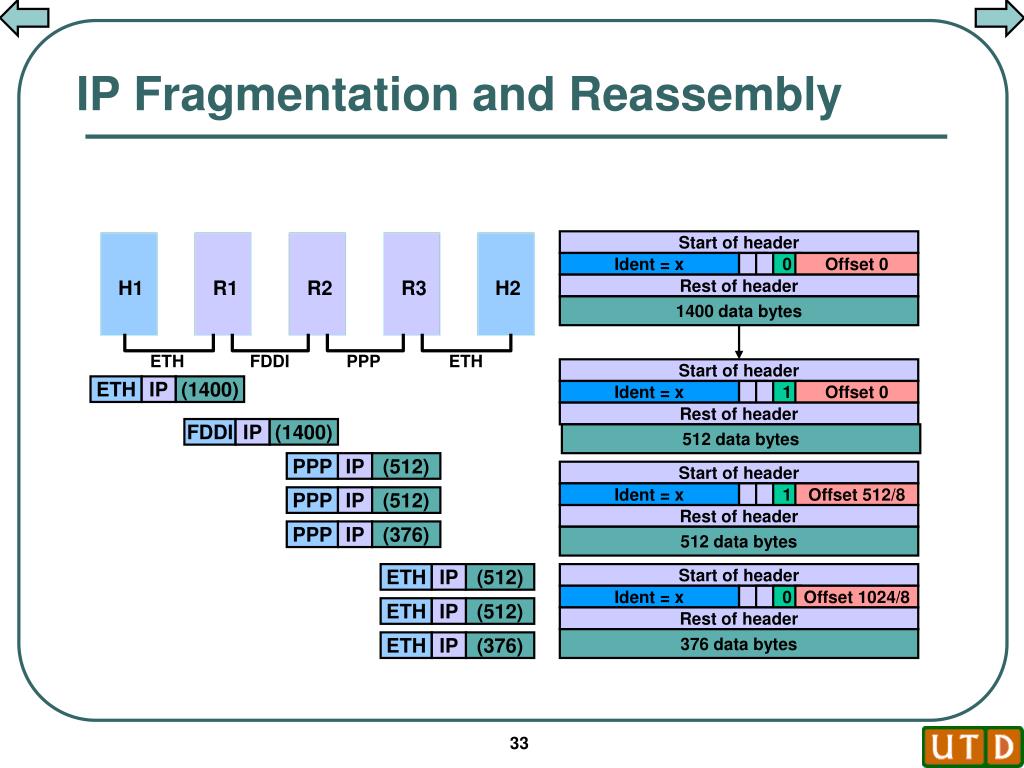
The Internet Protocol (IP) allows large packets to be broken into smaller “fragments” to fit through network segments with a small MTU (Maximum Transmission Unit). Each fragment contains an Offset value telling the receiver where that piece fits in the original data stream.
The Teardrop Attack
In a Teardrop attack, the attacker sends fragments with overlapping offsets.
The Logic: If Fragment A says it covers bytes 0–100, and Fragment B says it covers bytes 50–150, an unpatched operating system may become confused when trying to reassemble the data, leading to a system crash or “Blue Screen of Death.”
Analysis: In Wireshark, look for “Fragment overlap” warnings or multiple packets with the same identification number but conflicting offset values.
Fragmentation Evasion
Attackers use fragmentation to “slice” a malicious payload (like an exploit string) into pieces so small that an IDS (Intrusion Detection System) cannot recognize the signature. The IDS sees harmless fragments, but the target’s RAM reassembles them into a functional attack.
TCP Flags Manipulation: The Stealth Scan
TCP headers use six primary control bits (Flags) to manage connections. By sending “illegal” combinations of these flags, attackers can map a network without triggering traditional “Connection Established” logs.
Common Abnormal Scans
Null Scan: A packet with no flags set. According to RFC 793, a closed port should respond with an RST (Reset), but an open port may ignore it.
Xmas Scan: A packet with the FIN, PSH, and URG flags all turned on (lit up “like a Christmas tree”). This is computationally expensive for some systems to process and is used to identify the target’s Operating System based on how it handles the “messy” packet.
FIN Scan: Sending a FIN (Finish) flag to a port that hasn’t even opened a connection yet.
How to Spot Them
In packet analysis, look for a high volume of packets from a single source where the SYN flag is missing, but other flags are active.
> Formula for Success: Use the Wireshark filter tcp.flags == 0x00 to find Null scans or tcp.flags == 0x29 for Xmas scans.
ICMP Tunneling: The Silent Leak
The Internet Control Message Protocol (ICMP) is designed for diagnostics (e.g., “Destination Unreachable”). However, the ICMP “Echo Request” (Ping) allows for a Data Payload field, which is usually filled with junk data like abcdefg….
The Security Issue
Attackers can use tools to wrap sensitive data (like a password file or a remote shell) inside that payload field. Because many firewalls allow “Ping” traffic out of the network, this becomes a perfect tunnel for data exfiltration.
Detection Techniques
Payload Size: A standard ping is usually 32 or 64 bytes. An ICMP packet that is 1,200 bytes is a massive red flag.
Payload Content: Inspect the data portion of the ICMP packet. If you see readable ASCII text, encrypted strings, or “MZ” (the header for a Windows executable), you are looking at a tunnel.
Frequency: A steady stream of ICMP traffic to a single external IP that never stops is rarely just a “connection test.”
Summary Table: Identifying Anomalies
Anomaly Type |
Key Packet Field |
What to Look For |
|---|---|---|
Teardrop |
IP Offset |
Overlapping byte ranges in fragments. |
Null Scan |
TCP Flags |
All flags set to 0 (No SYN, ACK, etc.). |
Xmas Scan |
TCP Flags |
FIN, PSH, and URG flags set simultaneously. |
Tunneling |
ICMP Data |
Unusually large payloads or non-random data. |
2.4 - Detecting Network-Level Attacks
While protocol anomalies (Chapter 2.3) often involve “breaking” the rules of a single packet, network-level attacks involve manipulating the fundamental services that keep a network running. In this chapter, we focus on how attackers exploit trust in Address Resolution (ARP), IP assignment (DHCP), and Name Resolution (DNS).
ARP Spoofing/Poisoning (Man-in-the-Middle)
The Address Resolution Protocol (ARP) is inherently “trusting.” It maps a known IP address to a physical MAC address. Because ARP is stateless, a device will update its ARP cache even if it never sent a request—a flaw known as Gratuitous ARP.
The Mechanism
An attacker sends spoofed ARP messages onto the local network. The goal is to associate the attacker’s MAC address with the IP address of another host (typically the default gateway).
The Result: Traffic meant for the router is sent to the attacker first. The attacker can then inspect, modify, or drop the data before forwarding it to the actual destination.
Detection in the Packets
In Wireshark, look for the “Duplicate IP address configured” warning.
Evidence: Multiple MAC addresses claiming the same IP address.
Analysis: Filter by arp. If you see a sudden influx of ARP replies that were not preceded by an ARP request (unsolicited replies), it is a strong indicator of poisoning.
DHCP Starvation
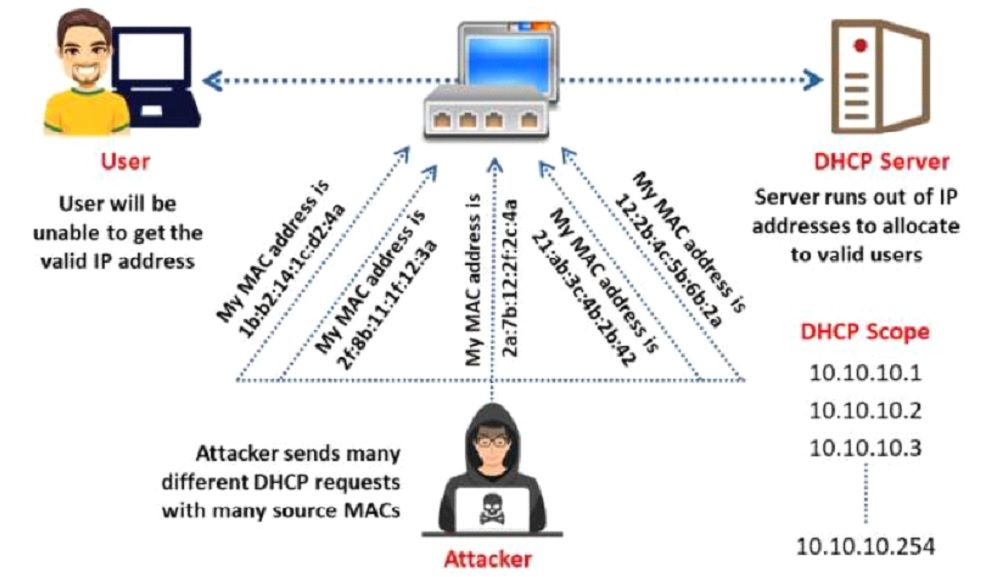
The Dynamic Host Configuration Protocol (DHCP) automates IP assignment. A DHCP Starvation attack is a Denial-of-Service (DoS) technique where an attacker attempts to “use up” every available IP address in a network’s pool.
The Mechanism
The attacker broadcasts a massive volume of DHCPDISCOVER packets. To bypass simple protections, the attacker forges a unique, fake MAC address for every single request. The DHCP server dutifully assigns an IP to each fake MAC until the pool is exhausted.
The Result: Legitimate users cannot join the network because there are no IP addresses left to lease.
Analysis and Detection
Volume: Thousands of DHCPDISCOVER packets appearing in a matter of seconds.
MAC Anomaly: Every request comes from a different source MAC address, but often follows a sequential pattern or shares the same Vendor OUI (the first 3 bytes of a MAC).
Filter: Use bootp.type == 1 to isolate DHCP requests and check the “Client Identifier” field.
DNS Poisoning & Tunneling
DNS is the “phonebook” of the internet. By poisoning this phonebook or using it as a transport for hidden data, attackers can control where users go or how data leaves the building.
DNS Poisoning (Cache Poisoning)
The attacker injects a fraudulent DNS entry into a recursive resolver’s cache.
Analysis: Look for DNS responses that arrive before the actual authoritative server can respond, or responses containing IP addresses that do not match the legitimate domain owner (verified via whois).
DNS Tunneling
Like ICMP tunneling, DNS tunneling encodes data into DNS queries and responses. Because DNS is almost never blocked by firewalls, it is a favorite for stealthy data exfiltration.
Detection - High Volume: A single host making thousands of DNS requests per minute.
Detection - Encoded Subdomains: Legitimate DNS queries are usually short (e.g., google.com). Tunneling queries often feature long, nonsensical subdomains containing encoded data:
> dGhpcy1pcy1zdG9sZW4tZGF0YQo=.attacker-domain.com
Summary of Detection Logic
Attack |
Protocol |
Primary Indicator |
|---|---|---|
ARP Spoofing |
ARP |
Two MAC addresses associated with one IP (Gateway). |
DHCP Starvation |
DHCP/BOOTP |
High frequency of DISCOVER packets from varied MACs. |
DNS Poisoning |
DNS |
Discrepancy between requested domain and returned IP. |
DNS Tunneling |
DNS |
High volume of TXT records or very long, random subdomains. |
2.5 - Application Layer Analysis (L7)
While lower-layer analysis tells you how data is moving, Layer 7 analysis tells you what the data is doing. This is where we inspect the actual “payload” of the conversation. At this level, we look for malicious intent disguised as legitimate application traffic.
HTTP/HTTPS Analysis: Web-Based Attacks
Most modern attacks are delivered over HTTP/S because it is allowed through almost every firewall. To find breaches, you must look inside the URI parameters and POST data.
SQL Injection (SQLi)
Attackers attempt to manipulate a back-end database by inserting SQL commands into web forms or URLs.
Detection: Look for keywords like SELECT, UNION, DROP, or ‘ OR 1=1– inside an HTTP GET or POST request.
Filter: http.request.uri contains “select” or http.request.body contains “union”.
Cross-Site Scripting (XSS)
In an XSS attack, the attacker “injects” malicious scripts (usually JavaScript) into a web page viewed by other users.
Detection: Look for <script> tags or encoded characters like %3Cscript%3E in the traffic.
Filter: http.request.uri matches “<script>”
Credential Harvesting: The Legacy Protocol Risk
Despite the shift toward encryption, many internal networks still use legacy protocols that transmit data in “Cleartext.” An attacker with a packet sniffer can see everything.
Telnet: All keystrokes, including usernames and passwords, are visible.
FTP: Commands like USER and PASS are sent without any protection.
HTTP (Non-S): Basic authentication sends credentials in Base64 encoding, which is easily reversible (it is not encryption).
> Analysis Tip: In Wireshark, use “Follow TCP Stream” on an FTP or Telnet session. If the protocol is unencrypted, the login credentials will appear in plain red and blue text.
Malware Beaconing: The C2 Heartbeat
Once a system is infected, it must “check in” with its Command & Control (C2) server to receive instructions. This check-in is called a Beacon.
Rhythm: Beacons are often highly periodic (e.g., exactly every 60 seconds).
Jitter: Advanced malware adds “jitter” (random delays) to avoid detection, but the pattern remains visible over time.
Detection: Look for a single internal host making repetitive, small requests to an unfamiliar external domain or IP, especially during off-hours.
Chapter 2 Quiz
2.1 - The Anatomy of a Packet
During the TCP Three-Way Handshake, if a client sends a SYN packet with a sequence number of 1000, what “Acknowledgment Number” should it expect to see in the SYN-ACK response from the server?
1000
1001
0
1002
Which layer of the OSI model is responsible for adding the Source and Destination MAC addresses to a frame?
Layer 1 (Physical)
Layer 2 (Data Link)
Layer 3 (Network)
Layer 4 (Transport)
2.2 - Mastering the Tools
You are capturing traffic on a high-speed 10Gbps link and want to avoid crashing your analysis machine. Which type of filter should you use to ensure only web traffic (Port 80/443) is saved to the disk?
Display Filter
Post-Capture Filter
Capture Filter (BPF)
Protocol Hierarchy Filter
In Wireshark, what is the primary advantage of using the “Follow TCP Stream” feature?
It encrypts the traffic for secure viewing.
It reassembles fragmented segments into a chronological, human-readable conversation.
It automatically blocks malicious IP addresses.
It decreases the size of the .pcap file.
2.3 - Protocol Anomalies
An analyst observes a packet where the FIN, PSH, and URG flags are all set to “1” simultaneously. What type of activity does this most likely indicate?
A standard file download.
An Xmas Tree Port Scan.
A Teardrop DoS attack.
An ICMP Tunneling attempt.
Why would an attacker use IP Fragmentation as an evasion technique?
To speed up the delivery of the exploit.
To bypass an IDS that cannot reassemble and inspect the full payload.
To hide the source MAC address of the attacking machine.
To encrypt the data without using SSL.
2.4 - Network-Level Attacks
You notice “Duplicate IP Address” warnings in Wireshark and see two different MAC addresses associated with the IP of your Default Gateway. What is the most likely attack in progress?
DHCP Starvation
DNS Poisoning
ARP Spoofing
SYN Flood
Which characteristic is a primary indicator of DNS Tunneling for data exfiltration?
A single DNS request for google.com.
High volumes of DNS queries with long, randomized subdomains (e.g., a1b2c3d4…attacker.com).
The use of Port 53 for encrypted HTTPS traffic.
A standard ICMP Echo Request.
2.5 - Application Layer Analysis
While analyzing an HTTP POST request, you see the following string in the payload: ‘ OR 1=1–. What type of breach is being attempted?
Cross-Site Scripting (XSS)
SQL Injection (SQLi)
Malware Beaconing
Brute-Force Attack
You observe an internal workstation sending a 100-byte packet to a suspicious external IP address exactly every 300 seconds (5 minutes) for 24 hours. What is this behavior called?
Credential Harvesting
Protocol Fragmentation
Beaconing
Three-Way Handshaking
Answer Key
Question |
Answer |
Explanation |
|---|---|---|
1 |
B |
The ACK is always Sequence+1 |
2 |
B |
Data Link handles MAC addresses |
3 |
C |
Capture filters save resources by discarding data before it hits the disk |
4 |
B |
Reassembly is key for L7 analysis |
5 |
B |
The ‘Xmas’ scan lights up the flags |
6 |
B |
Slicing the payload hides the signature |
7 |
C |
ARP mapping one IP to two MACs is a classic MitM indicator |
8 |
B |
Encoded data is smuggled in the subdomain |
9 |
B |
This is a common SQL bypass string |
10 |
C |
Rhythmic, automated ‘heartbeats’ indicate C2 communication |
Chapter 3 - SIEM Tools & Event Analysis
3.1 - SIEM Architecture & Data Collection
SIEM architecture is designed to provide holistic visibility into an enterprise’s security posture. It functions through a tiered process:
Data Aggregation: The process of gathering raw data from diverse sources, including network devices (firewalls, routers), endpoints (EDR logs, OS events), and cloud infrastructure.
- Collection Methods:
Agent-based: A software “forwarder” is installed on the host to push logs to the SIEM.
Agentless: The SIEM pulls logs via protocols like SNMP, WMI, or Syslog.
Storage Tiering: Raw logs are usually stored in a “hot” tier for immediate searching and a “cold” tier (long-term archives) for forensic or compliance purposes.
3.2 - Log Normalization & Parsing
Log Normalization is the process of converting unstructured data from different sources into a common, searchable format. Because a Windows server, a Cisco firewall, and an AWS instance all record events differently, the SIEM must “translate” them.
- Parsing: The SIEM uses a Parser (often based on Regular Expressions or Regex) to break a raw log string into specific fields.
Raw Log: 2023-10-05 14:00:01 SRC=192.168.1.1 DST=10.0.0.50 PROTO=TCP SPT=443 DPT=5678
Parsed Fields: Timestamp, Source_IP, Destination_IP, Protocol, Source_Port, Destination_Port.
Normalization: Once parsed, these fields are mapped to a Schema (e.g., Splunk Common Information Model or Elastic Common Schema). This ensures that “SrcIP” from a firewall and “SourceAddress” from an EDR are both stored simply as src_ip.
Data Enrichment: During this phase, the SIEM may add context, such as resolving an IP address to a geographic location (GeoIP) or flagging an IP known for malicious activity via Threat Intelligence feeds.
3.3 - Correlation Rules & Logic
Correlation is the “intelligence” of the SIEM. It involves analyzing disparate data points from multiple sources to identify patterns that signify a security threat. While a single log entry might seem harmless, a sequence of specific logs across different devices can indicate an attack.
- Rule Logic: Rules are typically “If-Then” statements.
Example: IF (5 failed logins on Host A) AND (1 successful login on Host A) WITHIN (60 seconds), THEN trigger “Brute Force Success” alert.
- Cross-Device Correlation: Linking events from different layers of the stack.
Scenario: An EDR logs a suspicious process execution on a workstation, and 10 seconds later, the Firewall logs an outbound connection to a known malicious IP from that same workstation. The SIEM correlates these via the Source_IP to flag an active infection.
Behavioral Baselines (UEBA): Modern SIEMs use User and Entity Behavior Analytics. They establish a “normal” pattern (e.g., User X usually logs in from New York at 9:00 AM) and trigger an alert if a significant deviation occurs (e.g., User X logs in from London at 3:00 AM).
3.4 - Alerting, Thresholds, and False Positives
Once the correlation logic identifies a potential threat, the SIEM must communicate that finding to a security analyst. This stage focuses on the transition from “data” to “actionable intelligence.”
Alerting Mechanisms: Notifications sent via Email, SMS, Slack, or integrated directly into a ticketing system (like ServiceNow or Jira).
- Thresholds: To prevent overwhelming analysts, SIEMs use numerical limits.
Example: Do not alert on 1 failed login. Only alert if the count exceeds 20 failures from one IP in 5 minutes.
- False Positives: These are “benign” events that look like attacks.
Scenario: A network scanner used by your IT team might trigger a “Port Scan” alert. Since this is authorized work, it is a False Positive.
Tuning: The ongoing process of refining rules and thresholds to reduce “Alert Fatigue.” If an alert is too sensitive, analysts may begin to ignore it, potentially missing a real breach (a False Negative).
3.5 - Incident Response Integration (SOAR)
Modern SIEMs often integrate with SOAR (Security Orchestration, Automation, and Response) platforms. While the SIEM detects the threat, the SOAR platform automates the response.
Orchestration: Connecting different security tools (Firewall, EDR, Email Gateway) so they can work together.
- Automation (Playbooks): Predetermined digital workflows that execute without human intervention.
- Scenario: If the SIEM detects a “Malicious File Download,” the SOAR playbook can automatically:
Isolate the infected laptop from the network.
Submit the file to a sandbox for analysis.
Block the source IP on the corporate firewall.
Case Management: Providing a central dashboard where analysts can track the progress of an investigation, document findings, and collaborate on high-priority incidents.
3.6 - Reporting & Compliance Auditing
The final phase of the SIEM lifecycle is focused on documentation and long-term oversight.
Compliance Reporting: Many industries (Finance, Healthcare) are legally required to prove they are monitoring their data. SIEMs generate automated reports for frameworks like HIPAA, PCI-DSS, or SOC2.
Executive Dashboards: High-level Visualizations that show trends over time (e.g., “We blocked 20% more phishing attempts this month than last month”) to justify security budgets.
Audit Trails: A permanent, tamper-proof record of who accessed what data and when. If a breach occurred six months ago, the SIEM’s “Cold Storage” provides the evidence needed for legal or insurance claims.
Retention Policies: Defining how long data must be kept. A policy might mandate keeping firewall logs for 1 year but database access logs for 7 years.
Chapter 3 Quiz
Which collection method involves the SIEM “calling” a device to request logs rather than the device pushing them automatically?
Agent-based
Agentless
Correlation Logic
Log Normalization
A security analyst sees two different logs: one labeled src_ip and another labeled SourceAddress. The process of mapping both to a single common field name is called:
Parsing
Data Enrichment
Normalization
Tiering
In SIEM terminology, what is a “False Positive”?
A malicious attack that the SIEM failed to detect.
A benign event that incorrectly triggers a security alert.
A successful login by an authorized administrator.
A correlation rule that has been disabled.
You have a rule that triggers an alert only if there are “10 failed logins followed by 1 successful login within 2 minutes.” This is an example of:
Data Aggregation
Correlation Logic
Cold Storage
Compliance Reporting
What is the primary functional difference between a SIEM and a SOAR?
SIEM is for small businesses; SOAR is for large enterprises.
SIEM handles data storage; SOAR handles data parsing.
SIEM focuses on detection; SOAR focuses on automated response.
SIEM is agent-based; SOAR is agentless.
Which storage tier is most appropriate for logs that must be kept for 5 years due to legal regulations but are rarely searched?
Hot Storage
Active Tier
Parsing Tier
Cold Storage
Answer Key
Question |
Answer |
|---|---|
1 |
B |
2 |
C |
3 |
B |
4 |
B |
5 |
C |
6 |
D |
Dashboards and Visualizations
SIEM Dashboards and Event Analysis Quiz
Which metric is most critical for ensuring a SIEM stays within its processing license limits?**
MTTR (Mean Time to Respond)
EPS (Events Per Second)
MTTD (Mean Time to Detect)
Total Log Storage (GB)
An analyst needs to visualize the geographic origin of a distributed brute-force attack over the last hour. Which visualization type is most appropriate?
Gauge Chart
Sankey Diagram
Heatmap
Time Series
What is the primary constraint of Real-time (Streaming) Analysis compared to Historical Analysis?
It cannot visualize more than one data source.
It is computationally expensive and limited to narrow time windows.
It requires manual query execution for every event.
It cannot be used for incident response.
In the context of “Drill-down Capabilities,” what is the typical final destination for an investigator?
A high-level Executive Dashboard.
A categorical Pie Chart.
The raw event log or payload.
A Gauged KPI widget.
Which stakeholder’s dashboard would most likely prioritize “Compliance Status (e.g., PCI-DSS)” and “Quarterly Risk Trends”?
SOC Analyst
Security Architect
Network Engineer
CISO (Chief Information Security Officer)
Which visualization is best suited for showing the flow of traffic from an internal subnet to various external destination IPs?
Sankey Diagram
Donut Chart
Gauge Chart
Line Graph
Answer Key
Question |
Answer |
|---|---|
1 |
B |
2 |
C |
3 |
B |
4 |
C |
5 |
B |
6 |
A |
Chapter 4 - System Hardening
4.1 - Least Privilege & User Access Control
The Principle of Least Privilege (PoLP) dictates that a user, process, or program must be limited to only the specific permissions necessary to perform its intended function. System hardening at the access level involves:
Disabling Default Accounts: Removing or renaming “Guest” or “Admin” accounts to prevent automated credential stuffing.
Role-Based Access Control (RBAC): Assigning permissions based on job functions rather than individual users.
Privilege Escalation Prevention: Restricting the use of sudo or setuid binaries to verified administrative users.
Strong Authentication: Implementing Multi-Factor Authentication (MFA) and enforcing strict password complexity and rotation policies via PAM (Pluggable Authentication Modules) or Active Directory.
4.2 - Service & Port Minimization
Service and port minimization focuses on reducing the system’s exposure by eliminating unnecessary software and communication pathways.
Attack Surface Reduction: Every active service (like a web server or database) and every open port (a logical entry point for data) represents a potential vulnerability. If a service is not running, it cannot be exploited.
Disabling Unnecessary Services: By default, many operating systems start services that are not required for a specific role (e.g., a print spooler running on a cloud web server). Hardening involves identifying and disabling these background processes.
Closing Unused Ports: Use tools like netstat or ss to identify listening ports. Common insecure ports (e.g., Telnet on port 23 or FTP on port 21) should be closed in favor of secure alternatives like SSH (port 22) or SFTP.
Inventory Management: Maintaining a strict list of “Approved Services” ensures that unauthorized software (shadow IT) is easily spotted and removed.
4.3 - Patch Management & Software Updates
Patch management is the systematic process of identifying, testing, and installing software updates (patches) to fix vulnerabilities and improve performance.
Vulnerability Remediation: Most cyberattacks exploit known vulnerabilities in outdated software. Patches are issued by vendors to “close” these security holes once they are discovered.
- Update Categories:
Security Patches: Critical fixes for specific security flaws.
Service Packs/Rollups: Cumulative sets of hotfixes and updates.
Firmware Updates: Updates to the low-level software on hardware components (e.g., BIOS/UEFI, network cards).
Testing vs. Deployment: In a hardened environment, patches are first deployed in a staging environment (a mirror of the production system) to ensure they do not cause system instability or software conflicts before being pushed to the live network.
Automation: Using tools like WSUS (Windows Server Update Services) or yum-cron/unattended-upgrades (Linux) ensures that critical security updates are applied within a defined window, reducing the “window of exposure.”
4.4 - Network Configuration & Firewalling
Network hardening involves securing the communication paths between the host and the rest of the network to prevent unauthorized data flow and lateral movement by attackers.
Host-Based Firewalls: Unlike perimeter firewalls, host-based firewalls (e.g., iptables/nftables on Linux or Windows Defender Firewall) filter traffic specifically for that device. A hardened configuration uses a “Default Deny” policy, where all incoming and outgoing traffic is blocked unless explicitly permitted.
Network Segmentation: Placing the system within a specific VLAN (Virtual Local Area Network) or subnet. This ensures that if one system is compromised, the attacker cannot easily access sensitive systems in other segments (limiting “Lateral Movement”).
Disabling Insecure Protocols: Hardening requires disabling cleartext protocols like HTTP, Telnet, and SNMPv1/v2, replacing them with encrypted versions such as HTTPS, SSH, and SNMPv3.
IP Stack Hardening: Configuring the OS kernel to ignore specific types of malicious traffic, such as ICMP redirects or IP source routing, which can be used in Man-in-the-Middle (MitM) attacks.
4.5 - Logging, Auditing, & Monitoring
Logging and auditing are the “eyes” of a hardened system. They provide the visibility required to detect unauthorized changes and investigate security breaches after they occur.
Audit Policies: Configuring the system to record specific events, such as failed login attempts, changes to system files, or modifications to user permissions. Without these records, an intrusion may go unnoticed indefinitely.
Centralized Logging: Forwarding local logs to a remote, secure server (e.g., using Syslog-ng or a SIEM like Splunk or ELK). This prevents an attacker from deleting local log files to hide their tracks after gaining access.
File Integrity Monitoring (FIM): Using tools (e.g., Tripwire or Aide) to create a cryptographic baseline of critical system files. If a core file is modified (indicating a potential rootkit or unauthorized change), an alert is triggered.
Real-Time Monitoring: Implementing active alerts for anomalous behavior, such as a high volume of traffic on a non-standard port or multiple administrative login failures within a short timeframe.
Chapter 4 Quiz
Which security principle is being applied when a database administrator is restricted from accessing the payroll department’s financial folders?
Defense in Depth
Least Privilege
Separation of Duties
Network Segmentation
A system administrator runs a scan and finds that Telnet (Port 23) is open. They disable it and enable SSH (Port 22) instead. This is an example of:
Service & Port Minimization
Role-Based Access Control
File Integrity Monitoring
Patch Management
What is the primary purpose of a “Staging Environment” in the patch management lifecycle?
To speed up the deployment of critical updates.
To save on licensing costs for production software.
To test patches for stability and compatibility issues before live deployment.
To provide a backup of the main server in case of a hardware failure.
How does “Network Segmentation” improve a system’s security posture?
It increases the speed of the local network.
It prevents attackers from easily moving laterally to other sensitive systems.
It automatically installs security updates on all connected devices.
It encrypts all data stored on the hard drive.
Which technology is specifically designed to detect if a critical system file, such as /etc/shadow, has been altered by an unauthorized user?
Multi-Factor Authentication (MFA)
Host-Based Firewall
File Integrity Monitoring (FIM)
Centralized Logging
A firewall policy that blocks all incoming traffic by default and only allows specific, pre-approved connections is known as:
Implicit Allow
Default Deny
Statefully Packet Inspection
Dynamic NAT
Answer Key
Question # |
Correct Answer |
Brief Explanation |
|---|---|---|
1 |
B |
Least Privilege: Restricts access to only the specific data or tools required for a job. |
2 |
A |
Service/Port Minimization: Decreases the attack surface by shutting down unneeded communication paths. |
3 |
C |
Staging Environment: Prevents production downtime by testing updates in a safe, mirrored environment first. |
4 |
B |
Network Segmentation: Acts as a “firewall” between departments to stop an attacker from moving through the network. |
5 |
C |
File Integrity Monitoring: Uses snapshots/hashes to alert when core system files are modified. |
6 |
B |
Default Deny: A strict security posture where no traffic is allowed unless it is on a pre-approved list. |
Chapter 5 - Network Security Assessment
5.1 - Vulnerability Assessment vs. Penetration Testing
A Vulnerability Assessment (VA) is a systematic, often automated process used to identify, quantify, and prioritize security weaknesses in a system. It is breadth-oriented, aiming to find as many vulnerabilities as possible without necessarily exploiting them.
A Penetration Test (Pentest) is a targeted, manual, and automated process designed to simulate a real-world attack. It is depth-oriented, focusing on exploiting identified vulnerabilities to determine the level of access an attacker could achieve and the potential business impact.
Key Differences:
Feature |
Vulnerability Assessment |
Penetration Testing |
|---|---|---|
Objective |
Identify known security gaps. |
Demonstrate exploitability and impact. |
Frequency |
High (Regular/Continuous). |
Lower (Annual/After major changes). |
Scope |
Comprehensive across the network. |
Focused on specific targets/paths. |
Outcome |
List of vulnerabilities (Patch list). |
Proof of Concept (PoC) and attack paths. |
5.2 - Reconnaissance and Footprinting
Reconnaissance is the preparatory phase where an assessor gathers as much information as possible about a target network to identify potential attack vectors. It is divided into two primary methodologies:
Passive Reconnaissance: Gathering data without directly interacting with the target’s infrastructure. This avoids detection by security systems (IDS/IPS). Examples include searching WHOIS databases, DNS records (using tools like nslookup or dig), and utilizing Open Source Intelligence (OSINT) through platforms like Shodan or Censys.
Active Reconnaissance: Engaging directly with the target systems to gain information. This carries a higher risk of discovery. Techniques include port scanning, banner grabbing, and network mapping.
Footprinting is the process of creating a blueprint or map of the target’s network profile. The goal is to determine: * IP address ranges and network blocks. * Domain names and subdomains. * Physical locations and employee information. * Technical stacks (operating systems, web server versions).
5.3 - Scanning and Enumeration
Scanning and enumeration represent the transition from general information gathering to identifying specific entry points and services.
Scanning This phase uses technical tools to identify live hosts and open ports. It involves: * Host Discovery: Determining which IP addresses are active (e.g., using ICMP pings or ARP requests). * Port Scanning: Identifying open TCP/UDP ports. Common techniques include:
TCP SYN Scan (Half-Open): Sends a SYN packet; if a SYN/ACK is received, the port is open. It does not complete the three-way handshake, making it harder to log.
TCP Connect Scan: Completes the full handshake. It is more reliable but easily detected.
UDP Scanning: More difficult due to the connectionless nature of UDP; relies on ICMP “port unreachable” messages.
Enumeration Enumeration is the process of establishing an active connection to the target to find detailed information about the “hidden” parts of the system. The goal is to identify: * User accounts and group names. * Network shares and file systems. * Service versions (Banner Grabbing). * Routing tables and SNMP data.
Real-World Comparison: If Reconnaissance was finding the building’s address, Scanning is checking every door and window to see which ones are unlocked. Enumeration is reaching through an unlocked window to see what’s on the desk or reading the names on the office mailboxes.
5.4 - Vulnerability Analysis and Scoring (CVSS)
Once you have a list of open ports and services, you must analyze them for weaknesses. This is Vulnerability Analysis. To standardize how “bad” a vulnerability is, the industry uses the Common Vulnerability Scoring System (CVSS).
The Process: * Vulnerability Research: Comparing the service versions found during enumeration against databases of known flaws, such as CVE (Common Vulnerabilities and Exposures). * Scoring: Assigning a numerical score from 0.0 to 10.0 based on severity.
CVSS Metrics include: * Attack Vector: How easy is it to reach? (Internet vs. Physical access). * Complexity: How much skill/effort is required? * Privileges Required: Do you need a password first? * Impact (CIA Triad): Does it hurt **C**onfidentiality, **I**ntegrity, or **A**vailability?
Real-World Comparison: Imagine you are a building inspector. You found an unlocked window (Vulnerability). * A window on the ground floor next to a busy sidewalk has a High CVSS score (easy to reach, low complexity). * A window on the 10th floor with no fire escape has a Low CVSS score (extremely difficult to reach, high complexity), even though it is still “unlocked.”
5.5 - Exploitation and Post-Exploitation
This phase moves from identifying potential weaknesses to actively proving they can be compromised.
Exploitation Exploitation involves using a specialized piece of software or a manual technique (an exploit) to take advantage of a vulnerability. The goal is to gain unauthorized access or bypass security controls. * Payload: This is the code that actually runs on the target system after the exploit succeeds (e.g., a “reverse shell” that gives the attacker a command prompt).
Post-Exploitation Once access is gained, the focus shifts to maintaining that access and determining the value of the compromised machine. * Privilege Escalation: Moving from a “standard user” to an “administrator” or “root” user. * Pivoting (Lateral Movement): Using the compromised machine as a jumping-off point to attack other systems deeper inside the network. * Persistence: Installing a “backdoor” so the attacker can return even if the system is rebooted.
Real-World Comparison: * Exploitation: This is the act of actually climbing through that unlocked window you found. You are now inside the building. * Post-Exploitation: Now that you’re inside, you look for the manager’s office keys (Privilege Escalation) and use the office’s internal hallway to reach the high-security vault in the basement (Pivoting). You might also leave a back door propped open so you can get back in tomorrow night (Persistence).
5.6 - Reporting and Remediation Strategies
The final phase of a Network Security Assessment is the most critical for the organization: translating technical findings into actionable business intelligence.
Reporting A professional assessment report is divided into two primary sections: * Executive Summary: A high-level overview for non-technical leadership. It focuses on risk, business impact, and the overall security posture rather than specific lines of code. * Technical Findings: A detailed breakdown for IT and security teams. This includes:
Description of the vulnerability.
The CVSS score.
Proof of Concept (PoC): Evidence that the exploit worked (e.g., screenshots of sensitive files or system access).
Steps to reproduce the finding.
Remediation Strategies Remediation is the process of “fixing” the gaps discovered. Common strategies include: * Patching: Updating software to a version where the vulnerability is fixed. * Hardening: Changing configurations to reduce the attack surface (e.g., disabling unnecessary services). * Compensating Controls: If a system cannot be patched, adding a secondary defense (like a firewall rule) to block access to the weakness.
Real-World Comparison: After your inspection, you give the building owner a Report. * The Executive Summary tells them: “Your building is at high risk of theft.” * The Technical Findings tell the handyman: “The latch on the third window of the north wall is broken.” * Remediation is the act of the handyman installing a new lock (Patching) or the owner hiring a security guard to watch that specific wall (Compensating Control).
Chapter 5 Quiz
Which of the following best describes a Vulnerability Assessment?
A deep-dive simulation of an attack to steal data.
A broad scan to identify and prioritize known security weaknesses.
The act of physically breaking into a data center.
Social engineering employees to get their passwords.
An analyst is using Shodan to find internet-facing webcams owned by a target corporation without interacting with the cameras directly. This is an example of:
Active Reconnaissance
Enumeration
Passive Reconnaissance
Post-Exploitation
Why is a TCP SYN scan often preferred over a TCP Connect scan?
It is faster because it uses UDP.
It completes the three-way handshake to ensure a stable connection.
It is quieter because it does not complete the three-way handshake.
It can bypass all modern firewalls automatically.
According to CVSS logic, how would “Required Privileges” affect a score?
A vulnerability that requires an Admin password has a higher score than one that requires no password.
A vulnerability that requires no password has a higher score than one that requires an Admin password.
Privileges do not affect the numerical score.
High privileges always result in a score of 10.0.
After gaining access to a low-level employee’s workstation, an attacker uses that machine to scan the internal HR database server. This movement is called:
Footprinting
Pivoting (Lateral Movement)
Banner Grabbing
Vulnerability Research
If a company installs a Web Application Firewall (WAF) to block malicious traffic toward an unpatchable legacy server, they are using:
Risk Acceptance
Patch Management
Compensating Controls
Reconnaissance
Answer Key
Question # |
Correct Answer |
Brief Explanation |
|---|---|---|
1 |
B |
Vulnerability Assessments focus on identifying and prioritizing security gaps (breadth), while Penetration Testing focuses on exploitation (depth). |
2 |
C |
Passive Reconnaissance involves gathering data through third-party sources (e.g., Shodan, WHOIS) to avoid direct interaction with the target. |
3 |
C |
A TCP SYN scan is “stealthier” because it resets the connection before the three-way handshake completes, often avoiding application logs. |
4 |
B |
Lower privilege requirements (e.g., “None”) result in higher CVSS scores because the vulnerability is more accessible to a wider range of attackers. |
5 |
B |
Pivoting (Lateral Movement) is the technique of using a compromised host to tunnel traffic into deeper, restricted network segments. |
6 |
C |
Compensating Controls are security measures (like firewalls) implemented to mitigate risk when a primary control (like patching) is not feasible. |
Chapter 6 - Firewalls & VPNs
6.1 - Firewalls: The Digital Bouncer
A Firewall is a network security device that monitors and filters incoming and outgoing network traffic based on an organization’s previously established security policies.
- Think of a firewall as a security guard at the entrance of a high-end club.
The Guest List: The firewall has a set of rules (Access Control Lists).
The Check: If your data packet is on the list (trusted), it gets in. If it looks suspicious or isn’t invited (untrusted), the guard stops it at the door.
How it works technically: It sits at the junction between your internal network (your private, trusted home Wi-Fi) and the external network (the wild, untrusted Internet). It inspects packets—small chunks of data—and decides whether to let them pass or “drop” them based on their source, destination, and type of content.
- Key Functions:
Blocking Unauthorized Access: Prevents hackers from “knocking” on your computer’s virtual ports.
Content Filtering: Can block specific websites or types of data from leaving your network.
6.2 - VPNs (Virtual Private Networks): The Private Tunnel
A VPN is a service that creates a secure, encrypted connection—often called a tunnel—between your device and a remote server operated by a VPN provider.
- Think of a VPN like a private armored limousine driving through a public highway.
The Highway: The public Internet. Anyone on the overpass (hackers or your ISP) can see cars driving by.
The Limo: Your data is inside the limo. Even though the limo is on the public road, the tinted windows (encryption) prevent anyone from seeing who is inside or what they are doing.
The Destination: The limo drops you off at a different building (the VPN server). To the rest of the world, it looks like you started your journey from that building, not your house.
- How it works technically:
Encapsulation: Your data packets are wrapped inside “outer” packets. This hides the original data’s details.
Encryption: The data is scrambled into unreadable code using a “key.” Only your device and the VPN server have the key to unscramble it.
IP Masking: Your real IP address (your digital home address) is replaced by the IP address of the VPN server. This makes it look like you are browsing from a different location (e.g., appearing to be in London while you’re actually in New York).
- Key Functions:
Privacy: Prevents your Internet Service Provider (ISP) from seeing which websites you visit.
Anonymity: Hides your physical location from websites.
Security: Protects your data on “sketchy” public Wi-Fi (like at a coffee shop).
6.3 - Packet Filtering vs. Proxy Services
While firewalls and VPNs are the “big names,” the way they handle data depends on the specific method of inspection. Two common methods are Packet Filtering and Proxy Services.
Packet Filtering
- This is the “speedy” method. The firewall looks at the header of a data packet (the digital envelope) but doesn’t open the “letter” inside.
The Comparison: Imagine a mail sorter who only looks at the Return Address and the Stamp. If the address is on a blacklist or the stamp is the wrong price, the letter is shredded immediately.
Pros: Extremely fast and efficient.
Cons: It can be fooled. If a “bad” packet has a “good” return address written on it (IP Spoofing), it might get through.
Proxy Services
- This is the “meticulous” method. A Proxy acts as a middleman. Your computer talks to the Proxy, and the Proxy talks to the Internet for you.
The Comparison: Imagine a Personal Assistant. You don’t go into the store yourself; you give your assistant a shopping list. They go in, buy the items, check them for defects, and bring them back to you. The store never sees your face.
Pros: Much more secure. The proxy opens the “letter,” reads the contents to ensure there is no hidden malware, and then re-packages it.
Cons: Slower than packet filtering because every piece of data has to be stopped, checked, and repackaged.
- The Key Difference:
Packet Filtering works at the network level (fast, surface-level).
Proxy Services work at the application level (slower, deep inspection).
6.4 - Encryption Basics in Transit
Encryption is the final layer of defense. While firewalls block intruders and VPNs hide your path, Encryption ensures that even if someone steals your data, they can’t read it.
- Think of encryption as a high-tech locked briefcase.
Plaintext: The readable message (e.g., “My password is ‘pizza123’”).
Ciphertext: The scrambled, unreadable version (e.g., “7x!9$qLm”).
The Key: The secret code used to lock and unlock the briefcase.
How it works in Networking:
When you send data over the internet, it uses two main types of encryption:
Symmetric Encryption:
Both the sender and receiver use the same key to lock and unlock the data.
Analogy: A shared house key. You and your roommate both have a copy of the exact same key.
Use: It’s very fast, so it’s used for the actual “bulk” data transfer.
Asymmetric Encryption (Public Key Infrastructure):
Uses a pair of keys: a Public Key (that anyone can see) and a Private Key (that only the owner knows).
Analogy: A mailbox. Anyone can drop a letter in (Public Key), but only the owner has the key to open it and read the letters (Private Key).
Use: This is how your computer safely “introduces” itself to a website (like Google or Amazon) before switching to a faster symmetric key.
HTTPS: The Green Lock
When you see https:// in your browser, it means your data is being encrypted using a protocol called TLS (Transport Layer Security). This combines both encryption methods to make sure your credit card numbers and passwords stay private.
Chapter 6 Quiz
Which network security device acts like a “bouncer” by checking data packets against a set of rules?
VPN
Firewall
Modem
Switch
What is the primary purpose of the “tunnel” created by a VPN?
To increase the physical speed of the internet connection.
To block all incoming traffic from hackers.
To create a secure, encrypted path for data across a public network.
To store copies of websites for faster access.
Which method of traffic inspection is generally faster because it only looks at the packet “headers”?
Proxy Service
Asymmetric Encryption
Symmetric Encryption
Packet Filtering
How does a Proxy Service improve security differently than basic packet filtering?
It uses two different keys for every data packet.
It acts as a middleman, inspecting the actual content of the data.
It physically disconnects the computer from the router.
It only allows traffic from a specific physical location.
What is the term for scrambled, unreadable data that has been processed by an encryption algorithm?
Plaintext
Packet
Ciphertext
Protocol
Which type of encryption uses a Public Key and a Private Key pair?
Symmetric Encryption
Asymmetric Encryption
Packet Encapsulation
IP Masking
In the context of networking, what does the “S” in HTTPS stand for?
System
Standard
Speed
Secure
Why might a school use a Proxy Server to help students download a large file?
To encrypt the file so the students can’t read it.
To bypass the school’s firewall entirely.
To cache (store) the file locally so the internet isn’t slowed down.
To change the file format from PDF to Docx.
When you use a VPN, what information is hidden from the websites you visit?
Your browser version.
Your real IP address and physical location.
The operating system you are using.
Your screen resolution.
Which encryption type is faster and therefore used for the “bulk” transfer of data?
Asymmetric Encryption
Public Key Infrastructure
Symmetric Encryption
Plaintext Transfer
Answer Key
Question # |
Correct Answer |
Brief Explanation |
|---|---|---|
1 |
B (Firewall) |
Acts as a bouncer, allowing or blocking traffic based on security rules (ACLs). |
2 |
C (VPN Tunnel) |
Creates a secure, encrypted path for your data to travel through the public internet. |
3 |
D (Packet Filtering) |
The fastest method; it only checks the “envelope” (headers) for source and destination. |
4 |
B (Proxy Service) |
Acts as a middleman, opening the “letter” to inspect the actual contents for threats. |
5 |
C (Ciphertext) |
The scrambled, unreadable version of data after it has been encrypted. |
6 |
B (Asymmetric) |
Uses a pair of keys: a Public Key to lock and a Private Key to unlock. |
7 |
D (Secure) |
The ‘S’ in HTTPS indicates the connection is secured via TLS encryption. |
8 |
C (Caching) |
Proxies store copies of data locally to save bandwidth and speed up downloads. |
9 |
B (IP Address) |
A VPN hides your real digital address and location from the websites you visit. |
10 |
C (Symmetric) |
Fast, single-key encryption used for high-speed bulk data transfer. |